
Multi-connection workspaces, tab groups, and a denser tables page
Open multiple SSO/MFA workspaces at once, organize your query tabs into Chrome-style groups, and browse your tables in a dense, peekable row list.
Multi-connection workspaces, tab groups, and a denser tables page
The biggest structural release since launch — we jumped straight from 0.8.0 to 0.8.5 to align the public release with the multi-connection cut. You can now keep several AWS connections open side-by-side, organize your query tabs the same way you organize browser tabs, and burn through a long table list in a fraction of the scroll distance.
Multi-connection workspaces
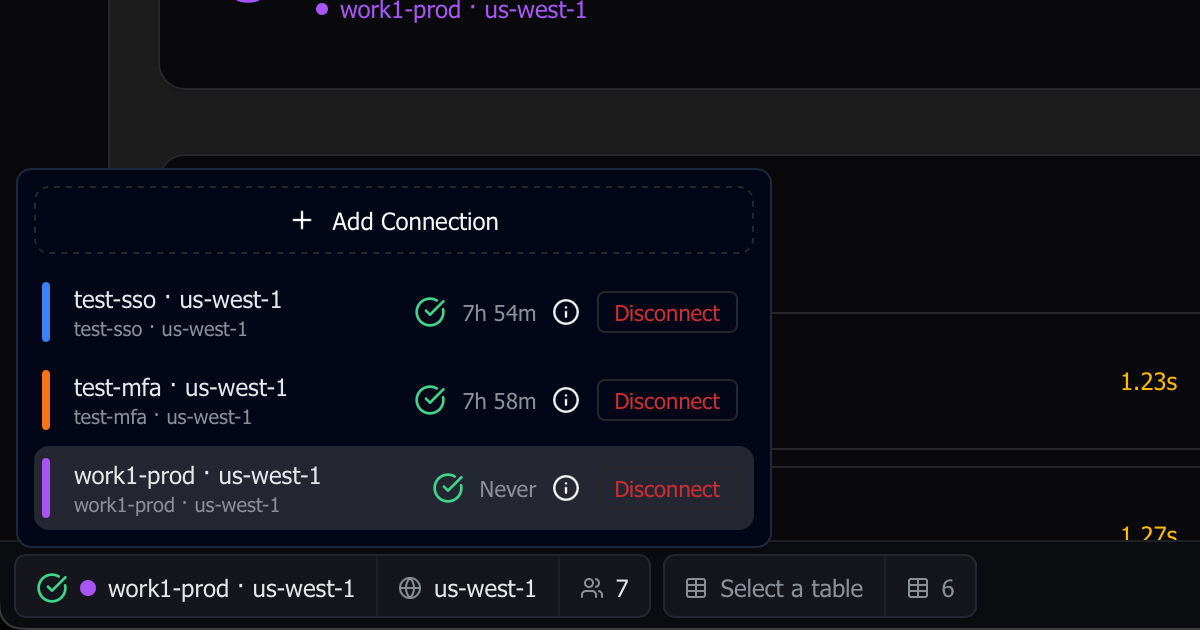
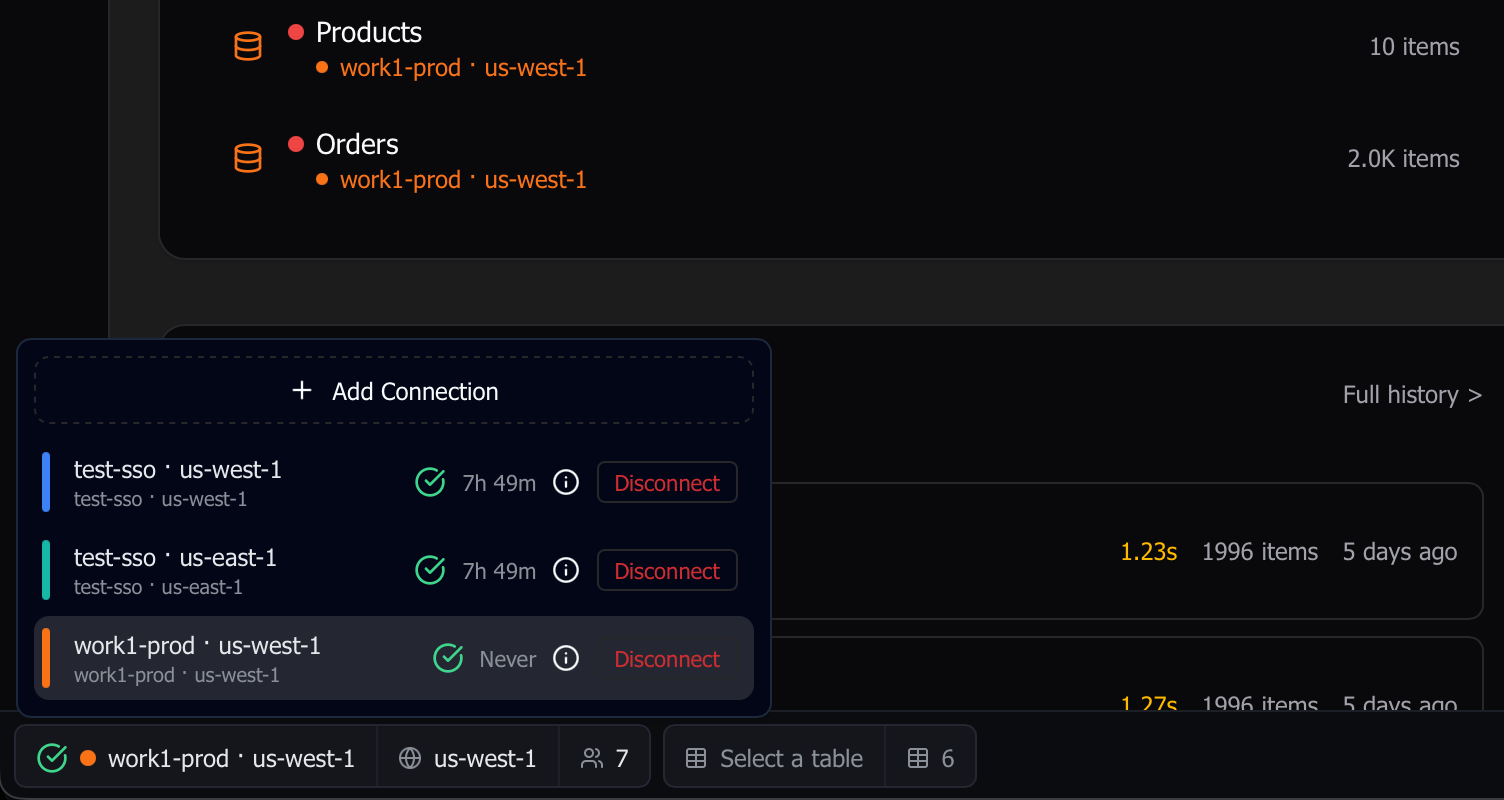
A workspace is one (profile, region) pair — a single connection to AWS. Previous releases let you have exactly one active at a time; you can now open as many as you want — different profiles, different regions, or the same SSO session shared across regions — and switch between them with one click in the status bar. Each workspace gets its own identity: pick a name and one of twelve colors so a glance at the status pill (or a tab’s leading icon) tells you which account and region you’re in. Renaming and recoloring happen inline in the connections popover.
Shared SSO sessions are deduplicated under the hood, so adding a second region for the same [sso-session] no longer kicks off another browser flow — the existing token is reused, and the session is torn down only when the last workspace using it disconnects. Wake-from-sleep behaves the same way: at most one browser tab opens for re-auth, not one per region.
The command palette spans every open workspace at once, so cmd+K searches tables across all of them, with each workspace’s rows scoped to that workspace’s own table-name filter (see below).
Tab groups for your queries
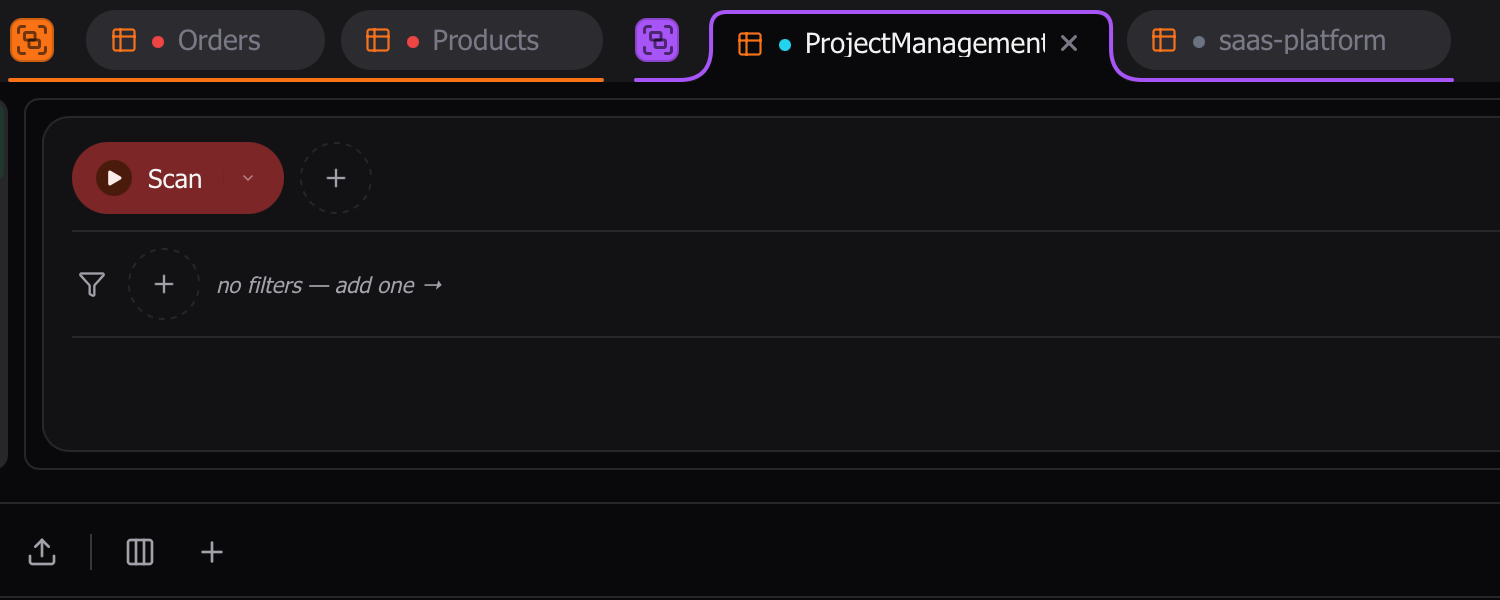
Query tabs now group the way browser tabs do. Open tabs against the same workspace auto-group together under a curved colored bracket; drag any tab onto the leading half of another to merge them into a new dynamic group; right-click the group indicator to rename it, recolor it (12-swatch palette), save it, close it, or ungroup its tabs. Drag the whole group by its indicator and it moves as one atomic unit — drop it past another group’s center and the groups swap as blocks, not tab-by-tab.
Don’t want a particular workspace’s tabs auto-grouped at all? Toggling “Ungroup all” on a workspace-bound group is sticky — that workspace won’t auto-group again until you turn it back on.
Groups can be saved. The persistent-groups popover (and the new :tabs palette filter, below) lets you reopen a saved group later; reopening resolves the workspaces it needs and activates the first tab. Memberships and saved groups survive a relaunch.
Two new switches in General Settings — “Group single tabs” (on by default) and “Show workspace groups only when multiple” (off by default) — let you tune how aggressive the auto-grouping is.
A denser /tables page
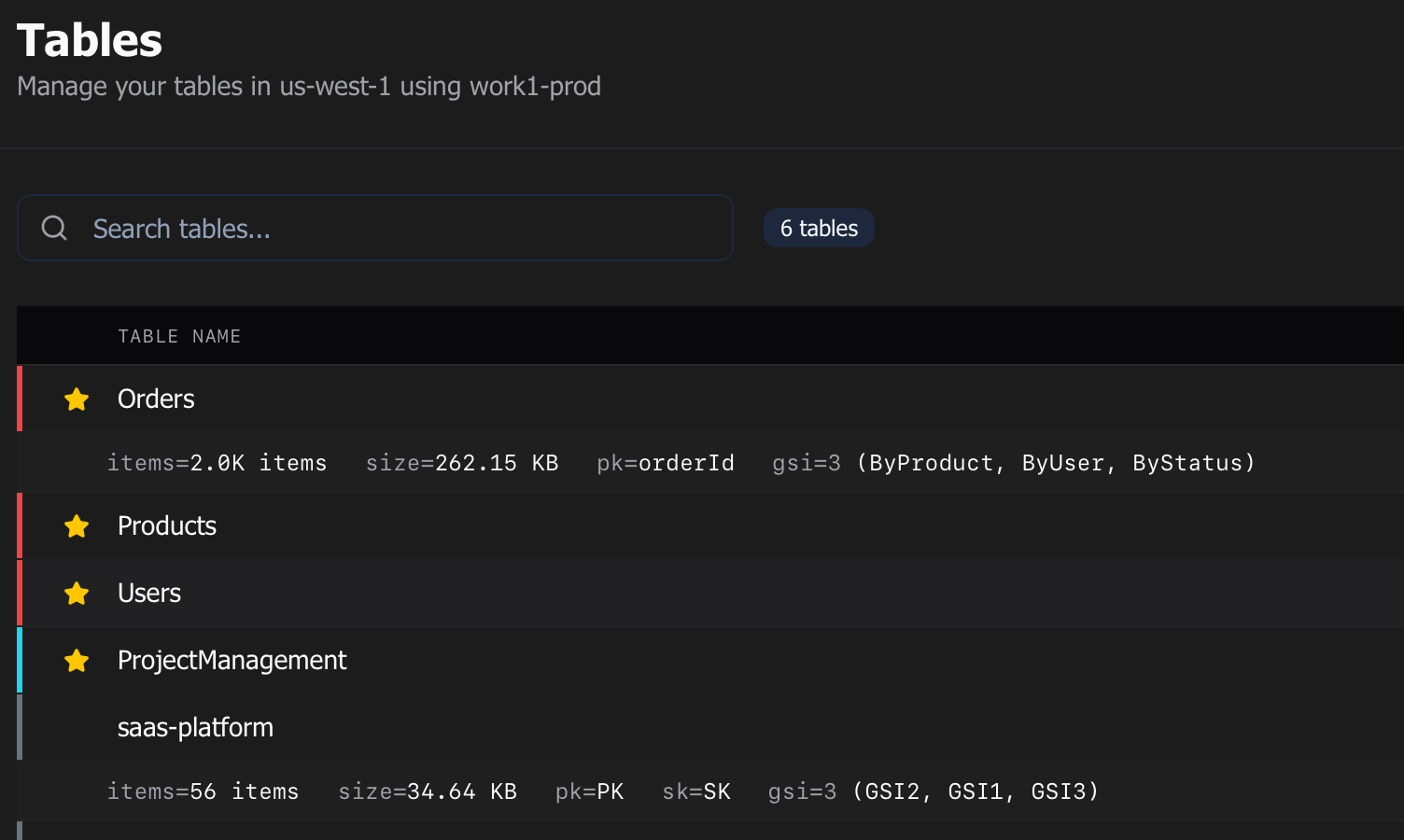
The /tables page is now a single-column dense row list instead of a 3-column card grid — roughly 2× as many rows per screen as the old grid. Click a row’s name to open the table; click anywhere else on the row to inline-expand a Peek strip with item count, size, partition key, sort key, and GSIs (lazily loaded, cached per session). Hover surfaces a Peek pill and a kebab menu; right-clicking a row opens the same menu (Open, Peek, Toggle Favorite, View Schema, Set Environment, Delete) without needing to find the kebab. Full keyboard navigation: ↑/↓/Home/End/PgUp/PgDn for selection, / to focus search, Space to peek, Enter to open.
Prefer the old layout? A [List · Grid] toggle in the toolbar flips back to the legacy grid view — kept for one release as an escape hatch.
Other improvements
- Get Started tour state now persists: a regression in 0.8.0 caused completed tour steps (and other recently-added onboarding settings) to be silently stripped on save, so the tour restarted every relaunch. They now stay put.
- Per-workspace table filters: the table-name prefix filter moved off global settings and onto each workspace, so
us-east-1andus-west-2can have completely different prefix filters. Existing global filters back-fill onto every workspace on first launch — no one loses their current setup. As part of this,cmd+K’s cross-workspace search now correctly respects each workspace’s own filter; previously, non-active workspaces’ rows in the palette leaked tables that should have been filtered out. :tabscommand palette filter: type:tabsincmd+Kto scope results to your saved tab groups. The Tab Groups section also appears in the defaultallview between Favorites and Profiles. Search matches against the group’s name and the table names of every member tab./queryempty state: closing your last query tab no longer bounces you to the dashboard. Instead, you land on a centered empty state with Search tables and Open tab group CTAs that drop you straight into the palette pre-scoped to:tableor:tabs. The “Open tab group” button stays hidden until you’ve saved at least one persistent group.
A polish release on top of 0.8.5: an honest connection-session counter in the footer (the old “minutes-to-expiry” countdown was misleading), a lock toggle for saved tab groups, and a tab-group bracket fix.
- Honest connection-session footer: the footer now shows an Active Xh Ym elapsed counter that resets only on a real re-authentication, replacing the previous countdown to the access-token expiry. The connection’s status is split into six honest states (Active, Refreshing, Expired, Static, MFA-prompted, Disconnected); a subtle ring spins around the status icon while a silent refresh is in flight. Legacy SSO configs that can’t silently refresh get a Renew button that re-runs the device-login flow.
- Connection and profile picker refresh: connection-picker rows pick up per-row attention borders, inline env color, and a deterministic account-ID picker when an SSO session matches more than one account. The profile picker reorganizes into AUTH / ENV / OPEN IN columns with a locked pill order (Sample → SSO → MFA → Local → static), avatar tooltips, and side-by-side region badges. The Disconnected state no longer hides the region/profile buttons, so you can recover from a dead session without leaving the footer.
- Out-of-band re-auths reset the counter: if another tool (the AWS CLI, another Dynomatic window, etc.) re-authenticates the same SSO session in the background, Dynomatic now notices and resets its Active counter to match. Orphan tabs from a previous launch also auto-rebind when their workspace reappears — either mid-session or at startup.
- Lock a saved tab group: open the right-click menu on a saved, non-workspace-bound group and click the lock icon on the Save Group row to freeze its membership. While locked, you can’t drag tabs in or out, drag-to-merge another tab onto it, or ungroup it — the cursor flips to
not-allowedwhen you try. Whole-group moves, within-group reordering, rename, recolor, and closing/reopening member tabs all still work; unsaving the group clears the lock. - Tab-group bracket follows whole-group drags: the colored bracket and active-tab scoop now track the indicator frame-perfectly when you drag a whole group across the strip. Previously it stayed frozen at the group’s pre-drag position while the tabs slid under the cursor.
A small hotfix for a 0.8.6 regression.
- Settings dialog no longer crashes: opening Settings in 0.8.6 could throw a
Tooltip must be used within TooltipProvidererror when the General → Default Profile select rendered the new profile badge. The badge now provides its own tooltip context, so Settings opens cleanly again.
A loaded patch — auto-refresh for query tabs, newly-added rows visible in the results grid, collapsible tab groups with custom icons, plus more tab-state survives a relaunch.
- Auto-refresh query tabs: a new clock dropdown next to the Refresh button lets you re-run the current query every 5s, 10s, 30s, 1m, or 5m. Errors coalesce into a single toast instead of one per tick, ticks that arrive while a previous fetch is still in flight are skipped, and a Skip command history toggle (on by default) keeps a 5-second interval from flooding your History page. PartiQL write statements (
UPDATE,INSERT, etc.) are excluded — they’re never re-run on a timer. Per-tab and ephemeral; closing the tab stops the timer. - Newly-added rows show in the results grid: clicking Add row used to stash the new row in the Pending Changes dialog without showing it in the results grid — you couldn’t see or inline-edit it until you committed and refetched. New rows now appear at the bottom of the grid immediately, ready to edit, with the same pending-change indicators as in-place edits.
- More query-tab state survives a restart: the column sort on the results table and the collapsed/expanded state of each tab group are now both persisted, so they come back the next time you launch Dynomatic. Row selection and the new auto-refresh interval survive tab switches but reset on restart by design.
- Collapsible tab groups: left-click a group’s indicator to collapse the whole group to a single pill (icon + name + member-count badge). Click again to expand. When the collapsed pill contains the active tab, it grows to match the active-tab footprint with the same bottom scoop so it lines up with the surrounding tabs, and the panel keeps rendering the hidden active tab. Drag and right-click both still work on the pill.
- Custom icons for saved tab groups: right-click a saved group → Set Icon and pick from a searchable grid of ~150 monochrome icons. The chosen icon replaces the generic group glyph in the indicator, the collapsed pill, and the saved-groups popover. A None tile clears back to the default; the icon survives un-saving and re-saving.
- Save Group and Set Icon no longer close the context menu: the right-click menu now stays open after saving (or un-saving) a group, and after picking an icon the submenu collapses while the parent menu stays put so you can keep editing. Sibling items like Ungroup and Close Group still auto-close as before.
- Schema scans remember imported vs skipped files: re-scanning a schema project no longer re-prompts for every file you already chose to skip. Each file’s prior decision is persisted per-project, and the new-file prompt only fires for files Dynomatic has never seen — a collapsed “previously skipped” section gives you a path back if you change your mind. The scanner also now excludes common non-schema directories by default (
migrations,seeds,__mocks__,__fixtures__,fixtures,.turbo,.cache,.vercel,.serverless,out,.output,storybook-static).
A small patch — three disconnected-workspace fixes for tab groups, plus a Settings dialog reorganization.
- Disconnected-workspace tab-group fixes: three related bugs around workspace-bound tab groups when their workspace disconnects. Renaming a group while the workspace is offline now both persists and displays the new name (previously the rename was saved but masked by the “Disconnected workspace” sentinel). When you reconnect a workspace — which produces a fresh internal id — its bound group automatically re-points to the live workspace and reads its name again, instead of staying stuck on “Disconnected workspace” forever. And with Group by Workspace Only When Multiple Open enabled, disconnecting one of several open workspaces no longer collapses every workspace bracket — brackets stay put and the disconnected group reads as a “Disconnected workspace” pill until you reconnect.
- Settings dialog reorganized: the Settings dialog goes from 6 tabs to 7, regrouped into APP / DATA / FEATURES so each setting lives with the noun it affects. A new AWS tab consolidates default profile, regions, max connections, and proxy settings; a new Tables tab (replacing Data) holds fetch tuning, auto-scan, the per-workspace prefix filter, the global show-raw toggle, and table-name cleanup. General now contains appearance and app behavior only, with the previously-mislabeled AWS header corrected. The Cleanup section dims when Show Raw Table Names is on, and the AWS-tab select labels are now properly associated for screen readers. UI-only — no persisted settings were added, renamed, or removed.