
Bring Your Own Single Table Design, in-tab schema queries, and AWS auth fixes
Dynomatic 1.0 introduces Bring Your Own Single Table Design: your table's entities, collections, access patterns, and relationships, inferred. Plus in-tab schema queries and an AWS auth overhaul.
Bring Your Own Single Table Design, in-tab schema queries, and AWS auth fixes
This is Dynomatic 1.0. The headline is Bring Your Own Single Table Design: point Dynomatic at any table and it reads the items and works out the single-table design behind them, no schema file required. Schema-aware querying has moved into the query tab, the add-profile dialog has been rebuilt, and AWS authentication picked up its largest batch of compatibility and correctness fixes to date.
Bring Your Own Single Table Design
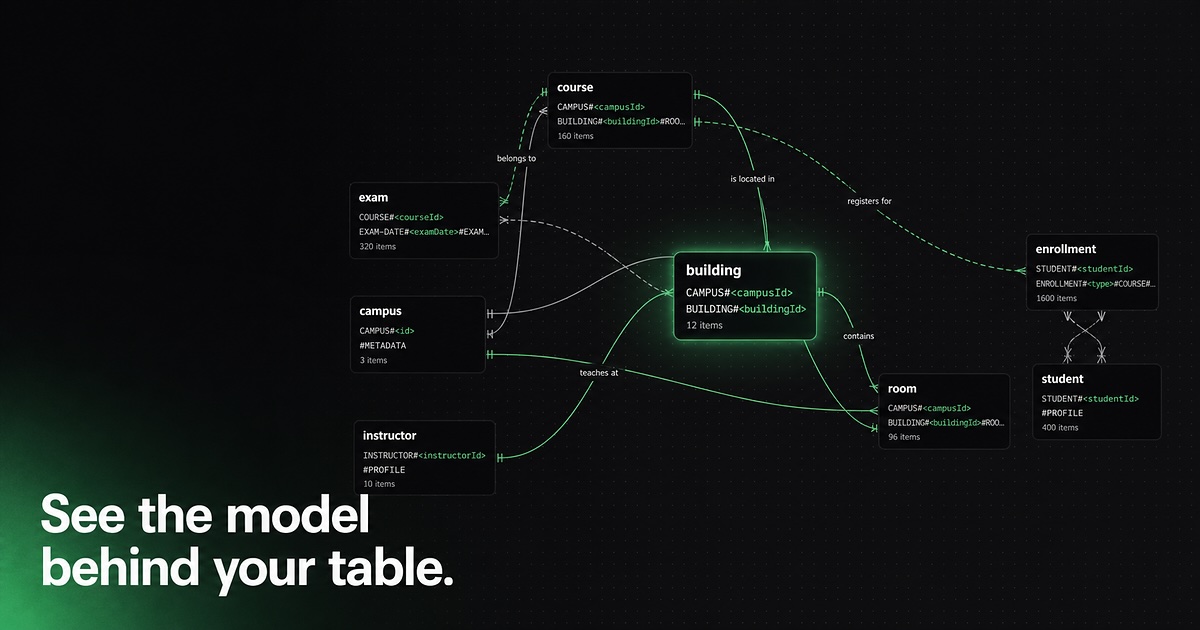
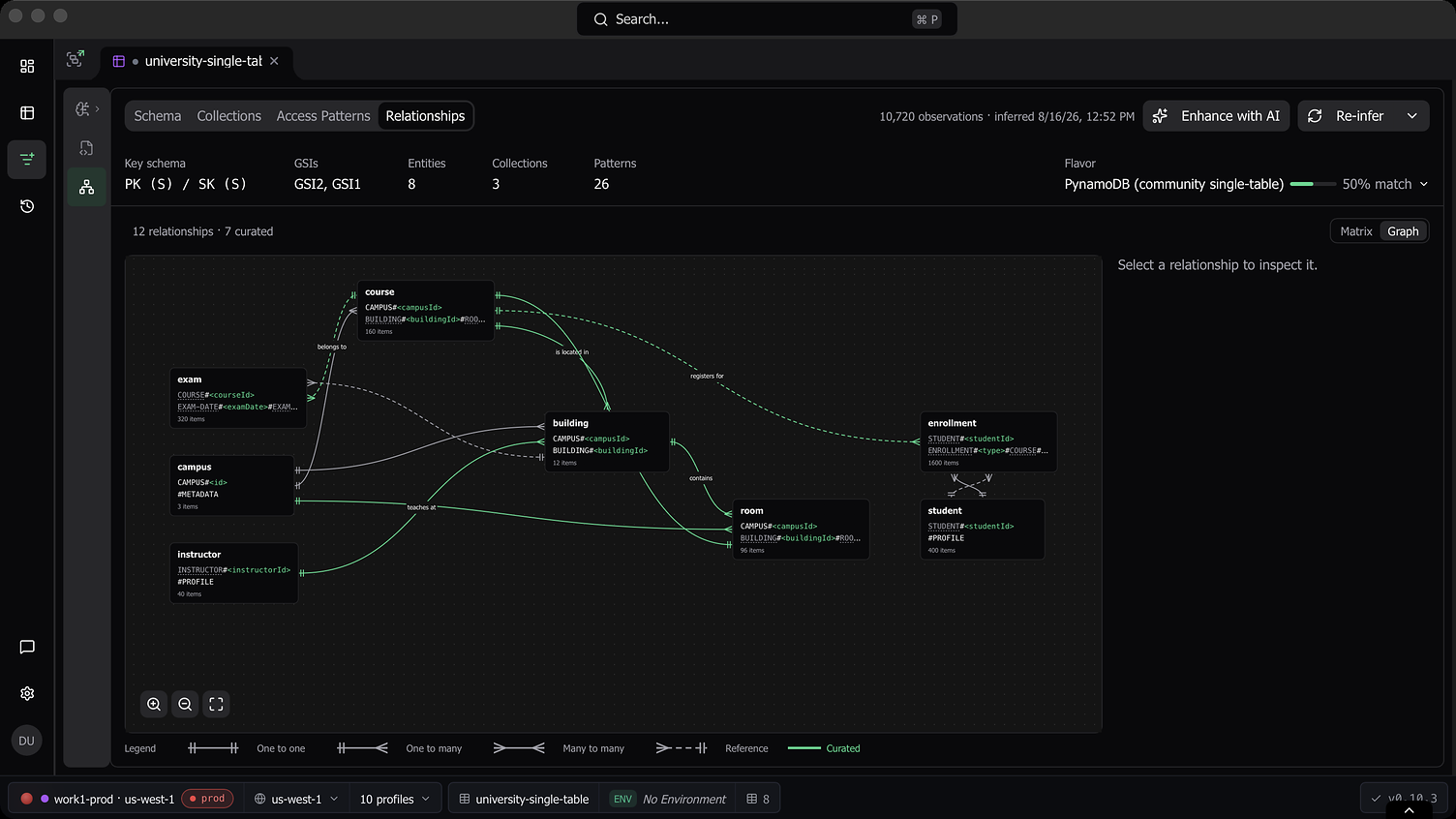
Single Table Design puts many entity types into one DynamoDB table, which makes the table hard to read back: the design lives in key conventions, not in a schema you can open. Bring Your Own Single Table Design recovers that design from the data itself, in the new Data Model tab. Dynomatic samples the items in your table and infers the entities and their key templates, the item collections they form, the access patterns those collections support, and the relationships between entities. Each of the four sub-tabs (Schema, Collections, Access Patterns, Relationships) presents its slice of the model in a ledger layout, and relationships can be viewed as a matrix or an interactive graph.
The engine also identifies which single-table-design flavor your table follows. It scores your keys against 13 known flavor profiles, covering libraries such as ElectroDB, OneTable, and TypeDORM as well as common hand-rolled conventions, and reports the top three hypotheses ranked by fit, each listing the conventions that matched, the ones that were expected but missing, and any that conflict. The flavor is a report, not a filter: inference never discards data for not matching the detected flavor, and you can override the detection if the engine picked wrong.
Every derived fact carries a confidence rating, shown as a three-bar indicator throughout the sub-tabs, so you can tell a template backed by hundreds of observations from one generalized off a handful of samples. Where the engine guessed, you can correct it: override the flavor, curate relationships, re-run inference whenever your data changes, or reset the model and start over. Bring Your Own Single Table Design is part of the paid plan.
Enhance with AI
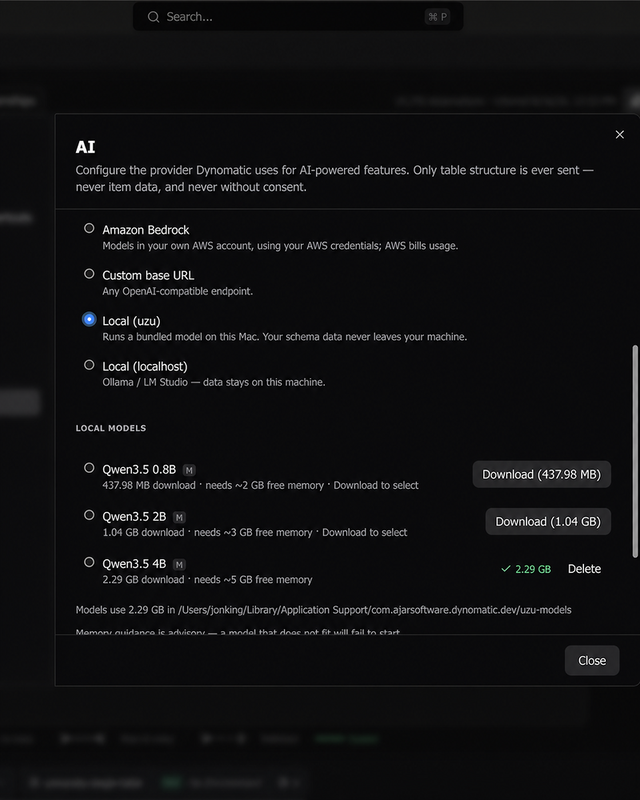
Structural inference can tell you an entity’s shape, but not what to call it. The optional Enhance with AI flow sends a redacted summary of the inferred model to a provider of your choice and fills in names and descriptions. You can use an AI CLI already on your machine, bring your own API key, use AWS Bedrock through your existing AWS credentials, or (on macOS) download a bundled local model that runs entirely on-device.
Enrichment is opt-in and asks for consent per provider and per account/region scope, so switching providers re-prompts before anything is sent.
Schema queries move into the query tab
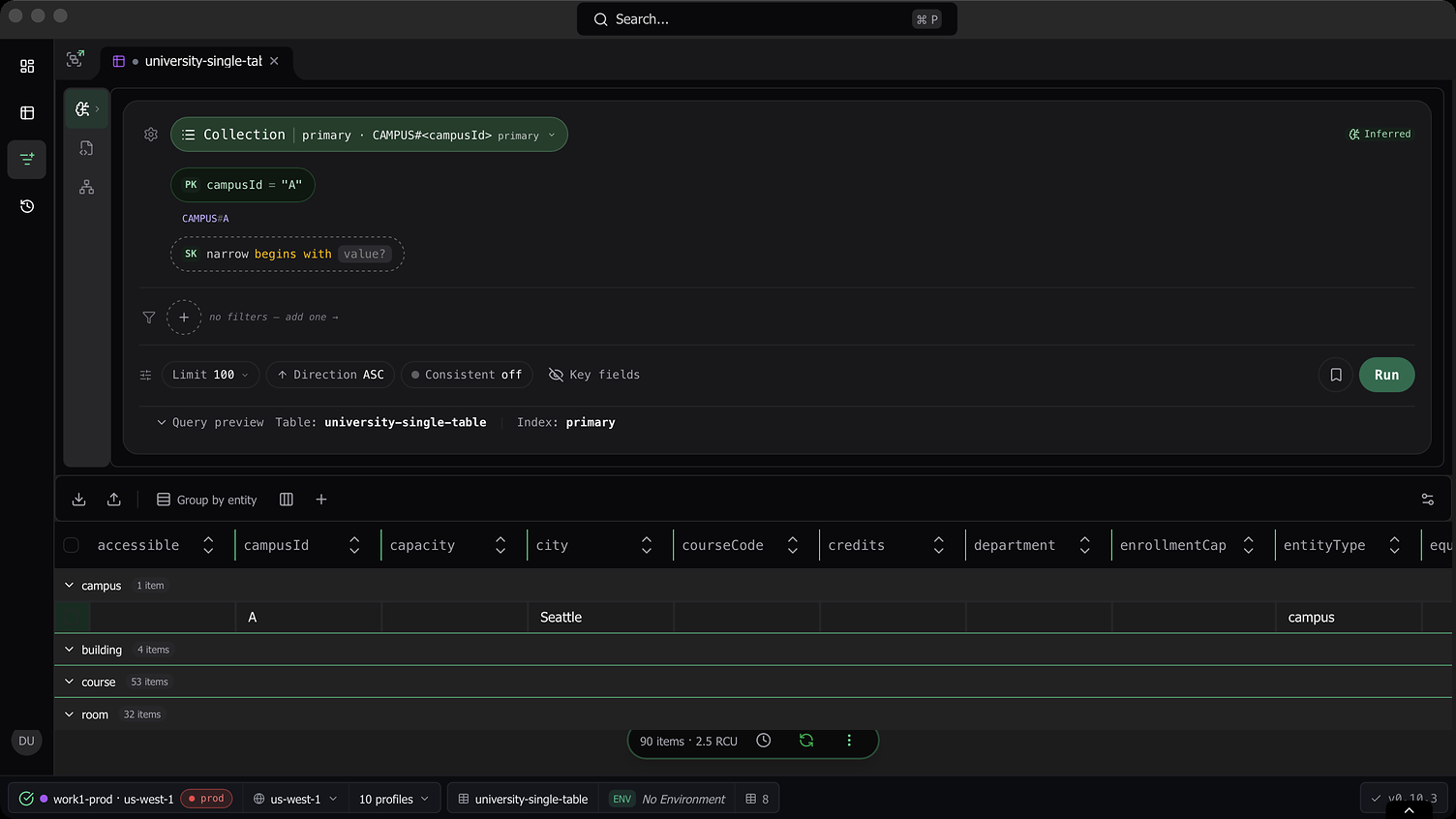
Schema-aware querying is now a third mode inside every query tab, in a grouped rail slot next to Builder and PartiQL. It shares the tab’s persistent results table, so schema results get the same editing stack and linked-cell pivots as everything else. Collection queries render as one grid with rows grouped by entity, with expandable group headers and item counts.
The standalone schema-query page is gone. Schema-first entry points now open a query tab directly and remember the last environment you used with each schema.
You can also query without writing a schema at all: the inferred data model from the Data Model tab is available as a schema source, covering both entity queries and collection queries, pivots included.
A redesigned add-profile dialog
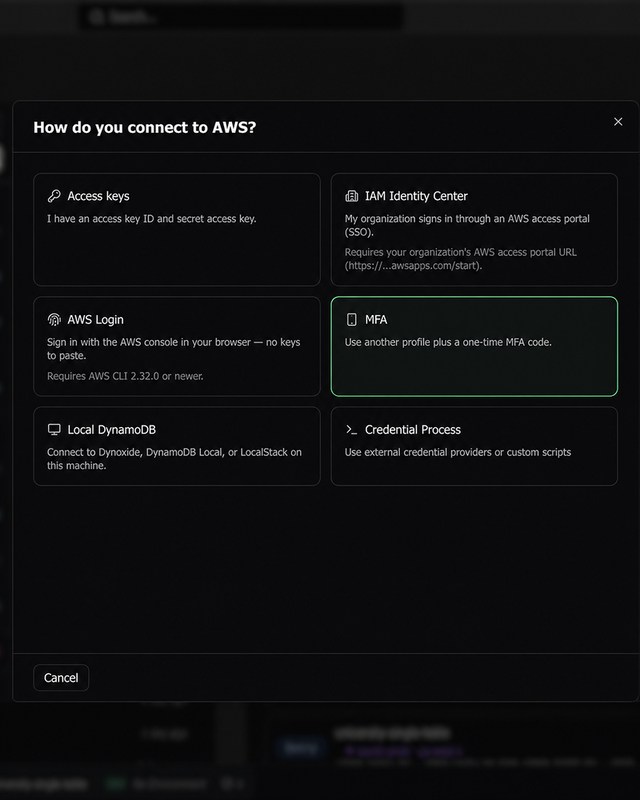
Creating a profile now starts with a full-panel chooser: five profile-type cards with plain-language guidance on when to use each. Picking one opens a focused form for just that type, instead of a single form that morphs as you toggle. Advanced options are collected under one disclosure, and editing an existing profile uses the same focused form.
AWS authentication improvements
- Profiles can now use
credential_process: point a profile at any credential-producing command and Dynomatic runs it directly (no shell) and parses the standard JSON output. - GovCloud and China partitions are supported, along with custom endpoint overrides.
AWS_CONFIG_FILE,AWS_SHARED_CREDENTIALS_FILE, andAWS_PROFILEare honored, so aws-vault, granted, and per-project config setups see the right profile list.- Selecting an INI profile now always uses that profile; credentials in environment variables no longer silently shadow your explicit choice.
- SSO session restore reads every AWS CLI cache layout (both the modern
sso-sessionformat and the legacy one), so a login started in the CLI is picked up reliably. - Expired or invalidated credentials are recognized from AWS error responses and route you straight to re-authentication instead of failing every request with a raw error.
- Cached credentials within 60 seconds of expiry are refreshed early, so requests no longer fail right at the expiry boundary.
- Concurrent requests share a single in-flight authentication instead of triggering duplicate logins or MFA prompts.
- MFA and OTP helper commands now run without a shell, closing a command-injection risk, and their output is validated before use.
Other improvements
- Dragging a background tab to reorder it no longer activates it; a plain click still switches tabs on release.
- Dragging a tab onto another to form a group now shows the merge highlight exactly where the merge will happen, regardless of the two tabs’ widths.
- In template inputs, pressing Escape undoes the
${[opener that ⌘/Ctrl-Space auto-inserts, as long as you haven’t typed inside it yet. - Editing a newly added row that hasn’t been committed yet no longer deletes the row.
- Schema rescans respect per-file decisions you’ve overridden (they are never re-prompted as new), and a failed rescan now shows an error instead of silently writing nothing.
A follow-up to 1.0 with tiered table settings, a fuller Sample Mode, an SSO fix for laptops waking from sleep, and the removal of Sentry.
- Table settings (page size, stream batch size, auto-scan, key-editing lock) now have two new tiers. Set them per workspace from the unified workspace settings panel, or per environment (production, staging, development) under Settings → Environment. A table resolves each setting in order: the table’s own override, then its environment’s defaults, then its workspace, then global. The settings popover shows which tier each value came from. Environment defaults can only tighten behaviour (turn auto-scan off or lock key editing), so a misclassified table never gains activity it shouldn’t.
- The query results empty state now explains why nothing loaded: whether auto-scan is suppressed by the production policy or turned off at a specific tier, with a link that opens the table’s settings.
- PartiQL results reported 0 consumed capacity even with capacity reporting on. Real capacity now shows in the results footer and in command history, and the expensive-operation warnings apply to PartiQL statements too.
- The consistent-read toggle now shows that it doubles read cost, with a 2× RCU badge that turns amber while it’s on.
- After your laptop woke from sleep, an SSO session whose token had expired could stay marked “Connected” and leave table queries spinning. Expired tokens now surface the reconnect prompt, and a fresh
aws sso loginin the terminal is picked up without reconnecting in-app. - The Data Model tab now hands off to the query tab: open an access pattern or item collection from the ledger and a schema query tab opens pre-filled with the entity, pattern, and key values.
- Sample Mode now has all features unlocked, including the Data Model tab, and adds a third table, UniversitySingleTable, so you can try Bring Your Own Single Table Design on a realistic single-table dataset. The sample data also gained stream activity, richer timestamps, environment variables, and pre-seeded command history.
- While a Sample Mode session is active, real workspaces are shown but inert, with a one-click Exit to return to them. S3 export and point-in-time recovery are marked unavailable for the sample profile instead of failing.
- Sentry has been removed. Dynomatic no longer sends any telemetry; errors are written to a local
logs/main.logunder the app data directory instead.