Querying
PartiQL editor
Write PartiQL statements with live validation, an advisory strip that explains what each statement will do, editable results, and scripts of writes that can run as one transaction.
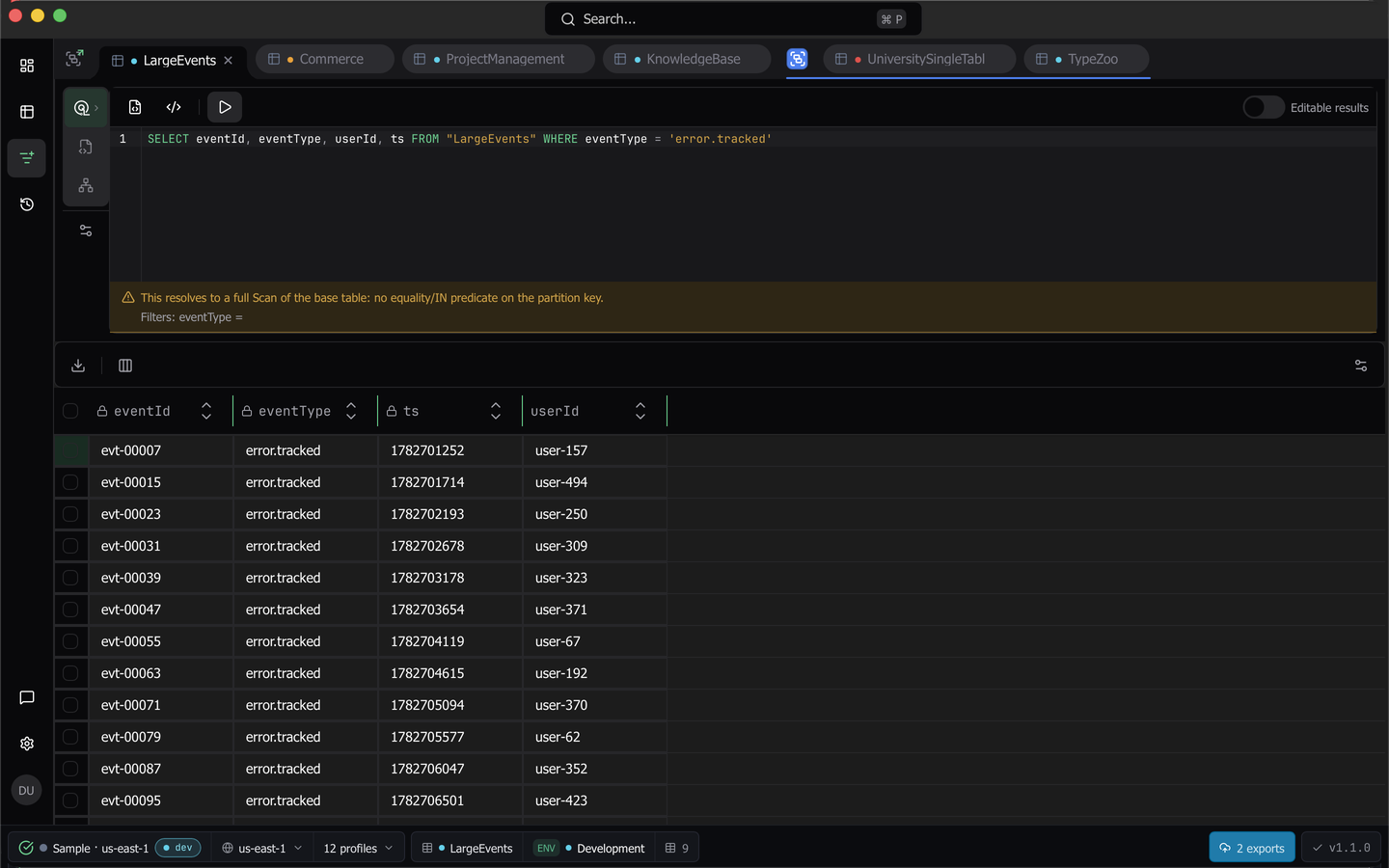
The PartiQL flavor of a query tab is a SQL-mode editor for DynamoDB’s PartiQL dialect. A real parser validates as you type, and an advisory strip under the editor tells you whether the statement resolves to a GetItem, a Query or a full table Scan before you run it. PartiQL requires the Pro plan.
Open it and run a statement
Hover the Query trigger in the tab’s rail and choose PartiQL. The editor opens seeded with SELECT * FROM "<your table>".
Press Run, or press Cmd+Enter (Ctrl+Enter). Results land in the same grid the query builder uses, with Load more results paging through DynamoDB’s NextToken. Cmd+S saves the statement.
The results stay in the grid when you go to History or Tables and come back. The rows, the stats, and the Load more results position are the same as you left them. Closing the tab clears them.
Read the advisory strip
The strip under the editor is a static reading of the statement, produced without sending anything to AWS. It names the operation and the index that will serve it, for example GetItem on the base table or Query on the base table. A statement with no equality or IN predicate on the partition key reads This resolves to a full Scan of the base table.
Below the headline, caveats explain the decomposition. A predicate on a non-key attribute reports that it is applied as a filter, an unsupported sort key operator reports that it was demoted to a filter, and a projection naming attributes the resolved index does not carry reports that DynamoDB will reject the statement.
Against a workspace classified as production, a full scan escalates to Blocked.
Note:
Blockedis a severity label, not an execution gate. The statement still runs. Only a syntax error stops Run.
Errors, warnings and quick fixes
Structural problems, such as an unterminated quote, an unbalanced paren or a missing FROM, underline in red. The Run button stays focusable but inert, and its name becomes the reason, for example Statement has a syntax error: Unterminated quote.
Constructs DynamoDB rejects underline as warnings and leave Run enabled, because DynamoDB remains the arbiter. These include JOIN, GROUP BY, LIMIT, subqueries, IN (...) with parens, LIKE, IS NULL, CAST, SQL-only functions, multi-statement scripts that are not all writes, and double-quoted string values. Where DynamoDB has an equivalent, the diagnostic offers a one-click rewrite, such as Use brackets for IN [...] or Change to ‘USER#001’ for a value written with double quotes.
Schema-aware checks add warnings of their own. An attribute no query has ever returned reads <name> is not among the sampled attributes of <table>., and an unknown table name is flagged too.
Hover an underline to read its message and apply its fix. Template variable tags and SQL comments never produce a finding.
Run a script of writes
To change several items in one run, write two or more INSERT, UPDATE, or DELETE statements separated by semicolons. When every statement is a write, a Run in transaction checkbox appears next to Run. The advisory strip explains each statement separately.
- With Run in transaction checked, Dynomatic sends every statement in one ExecuteTransaction call. Either all of the statements apply or none of them do. On success, a toast reads
Transaction committed with <n> statements. - With the checkbox cleared, which is the default, the statements run one at a time in order and stop at the first failure. The statements before the failure stay applied, and the statements after it never run. The error names the failed statement and how many ran before it, for example
Statement 3 of 5 failed, so the statements after it did not run. Statements already applied: 2., followed by DynamoDB’s message.
A script that includes a SELECT gets no checkbox. It keeps the multi-statement warning, because Dynomatic sends it to DynamoDB as written. Command history records a script of writes as one write, with the capacity of every statement added together.
Edit the results
A SELECT that omits the key attributes returns rows Dynomatic cannot write back. Turn on Editable results and the statement is rewritten to project the keys alongside your chosen attributes, so SELECT email FROM "Users" WHERE ... becomes SELECT email, "pk", "sk" FROM "Users" WHERE ... and re-runs. Key cells stay locked, and the rest edit and commit exactly as in the data grid.
Snippets and files
Insert snippet offers read and write statements filled in with the tab’s real table, key and index names, rather than generic placeholders.
Queries holds the saved statements for this tab, scoped to PartiQL, along with Save, Save As…, Open from File… and Save to File… for working with .sql files on disk.
Cost reporting
Every run reports the capacity DynamoDB actually consumed, with a per-index breakdown where DynamoDB returns one, accumulated across paged loads. The tab’s own readout shows items, bytes and time. The capacity figure appears on the run’s card in command history, and an expensive statement lands in the Warnings bucket there.
Comments are stripped from the statement before execution, quote-aware so a -- inside a string literal survives, and they stay in your editor.
Last updated on