
Vector search
Embeddings
Set up an embedding provider, write a recipe that says what text to embed, dry run it, then backfill and verify your table's vectors.
A vector index searches over vectors, and something has to write those vectors into your items. An embedding recipe says which items to cover, what text to send, which model to send it to, and where the result is stored, then backfills the table under a plan and a confirmation.
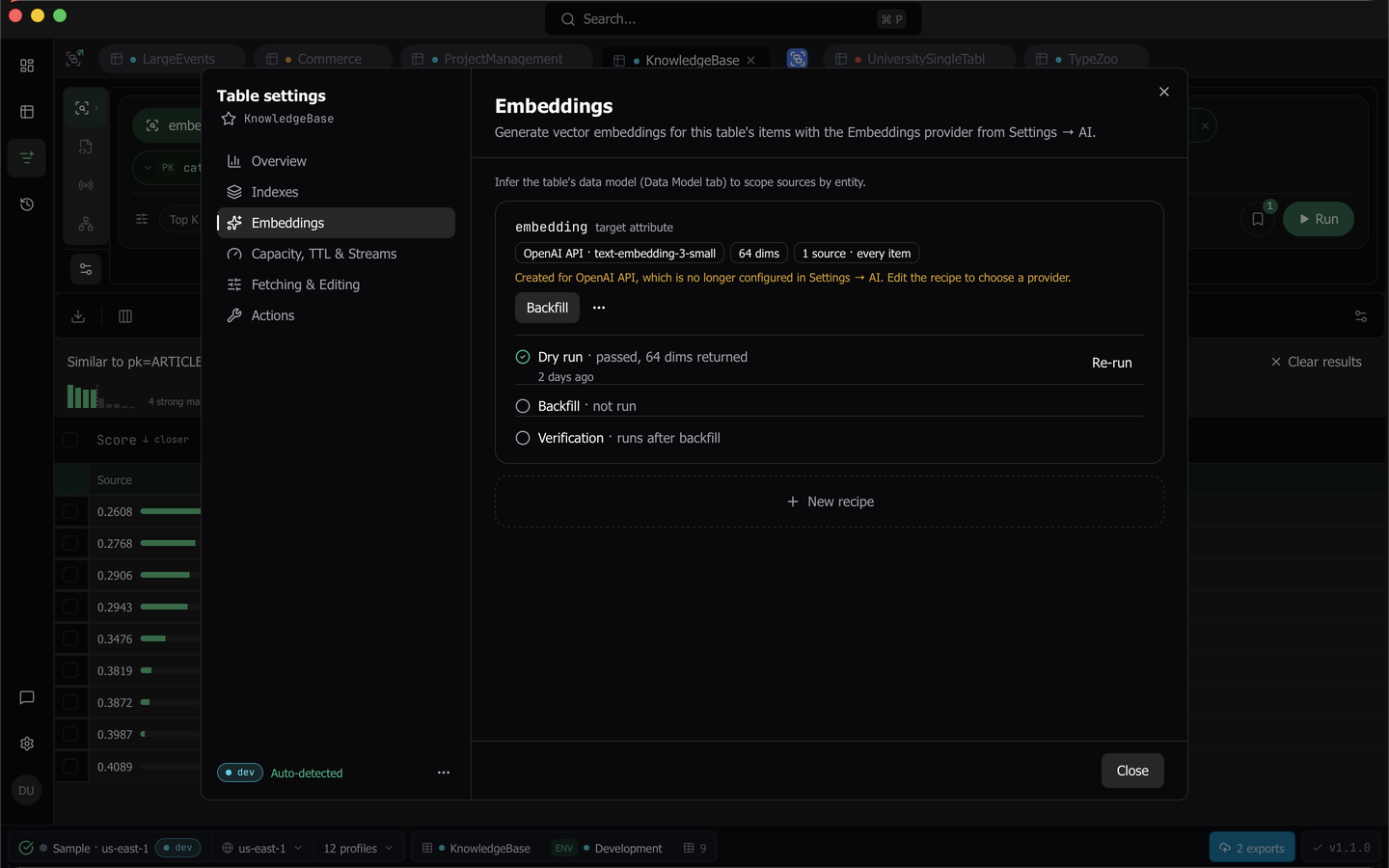
Note: The Embeddings section is behind the Vector Search plan gate, and Settings → AI is plan-gated alongside Data Model. Without the plan the pane stays readable and shows an upgrade state.
1. Configure an embeddings provider
Open Settings → AI. Completions and Embeddings are configured independently, each with its own provider, model, and Test connection, and either can be Off, which is the default.
The embedding-capable providers are OpenAI, Amazon Bedrock, a custom OpenAI-compatible base URL, and Local (localhost), which is the preset for a local server such as Ollama or LM Studio. Claude Code, Codex, and the Anthropic API do not offer embeddings, and the section says so.
The header states exactly what the capability sends. Embeddings sends the item text you choose to embed, and never without confirmation. Connection credentials are entered once per provider kind and shared with Completions, and API keys go to the OS keychain write-only, so a stored key never displays back. Test connection embeds a fixed string and reports the dimension count that came back, which is the width a vector index would be created against. Bedrock authenticates with an AWS profile and a Bedrock invocation region rather than an API key, and its model picker lists embedding models only.
2. Write a recipe
Open a query tab on the table, click Table settings in the rail, and choose Embeddings. There is one recipe per table and target attribute, so a table can carry two embeddings of different text. New recipe opens the editor.
- Provider and Model are two controls side by side. The recipe’s own model is what every embed call uses, so changing the model in Settings later does not break an existing recipe.
- Dimensions offers the widths that model actually supports, with the model default named. An unknown model keeps “Model default” and the dry run reports the real width.
- Target attribute is where the vector is written, and it may not be a key attribute. Typing a name the table already carries warns that a backfill will overwrite it on every matched item.
- The content hash is one switch, which writes a digest of the rendered text plus the model, the width, and the write time beside the target. With it on, a re-run skips items whose text has not changed. With it off, every run re-embeds every matched item.
- Sources are one text template per entity, plus an optional “Every item” source that catches the rest and is always evaluated last. Insert chips offer the attributes Dynomatic has observed, and each source previews itself against an item already loaded in the grid, updating as you type, with no read issued and no call to the provider.
Save and dry run saves and starts the dry run in one click. Plain Save just saves.
3. Dry run
A dry run reads and embeds but never writes, and it is allowed on any tier. It embeds a sample of items per source, 1 to 20 with 5 as the default, drawn from a bounded scan, and reports the rendered text per sample, the dimensions that came back, the tokens per source where the provider reports them, and an extrapolation covering items, calls, tokens, and storage. Every count is labeled approximate.
The first dry run or backfill for a workspace and provider asks Send item text to AI?, naming the provider and stating that rendered item text is sent. Cancelling records nothing.
A sampled item that renders to an empty string refuses the dry run and names the source and the item, because that is the item a backfill would skip. A source with no match in the sample is reported for information only.
A passing dry run of the current recipe is required before a backfill can start.
4. Backfill
Backfill opens a plan, preview, and confirm gate on every tier, listing the items, calls, tokens, storage, target attribute, hash attribute, provider, model, dimensions, and scope. On a table not classified staging or development, the preview opens as Write embeddings into <table>? instead, says why the table counts as production, and starts only after you type the table’s name. That covers an unclassified table as well as a production one. See Confirm a write into a production table.
Click Start backfill to start it. The backfill runs as a background job named Embed <attribute> on <table>, so it keeps running after you close Table settings, and the Background jobs panel in the status bar lists it too.
The run scans, matches, renders, embeds, and then issues an UpdateItem that touches the target and hash attributes only. It never writes another attribute, never uses a Put, and never creates an item. It is paced with backoff when the provider or DynamoDB throttles. Its writes share one write budget with any other job on the same table, as How job pacing works explains.
While it runs you see six counters, scanned, matched, embedded, unchanged, empty, and failed, plus a Failed items list naming each rejected item’s key and DynamoDB’s message, and the run survives tab switches and remounts. Pause keeps the checkpoint, Resume continues from it, including after an app restart, and Cancel stops and keeps the items already written, because there is no rollback. A backfill refuses to start when the recipe’s dimensions disagree with an existing vector index on the target attribute, when the provider or model no longer matches the recipe, or when there is no current dry run.
Pause, Resume, and Cancel work from the card and from the job’s row in the panel alike. Quitting Dynomatic pauses a running backfill, and it waits for you to resume it after you reopen the app. A backfill that stopped on an error offers Retry, which continues from its checkpoint.
5. Verification
Verification runs automatically after a completed backfill, and on demand from the card’s actions menu. It is a full read of the table projected to keys, entity markers, and the target attribute, so its counts are exact rather than approximate, and the row says so.
The report reads as current, missing, wrong dimension, and foreign. Foreign means the target attribute is present without this recipe’s hash, so something else wrote it, and the column is hidden for a recipe that tracks no hash. Details opens the same breakdown per source. Re-run on missing or wrong dimension starts a backfill scoped to exactly those items.
Things to know
- Deleting a recipe never touches your items.
- Items matching no source are skipped on purpose, which is how a sparse index is built.
- A backfill from an earlier version of Dynomatic moves into Background jobs on its own. If Dynomatic cannot tell which workspace ran it, the recipe card says why and what to do.
- An import can embed the rows that arrive without vectors, with the table’s recipe. See Import.
- Recipes survive re-inference of the data model. A source whose entity no longer exists pauses the backfill rather than skipping silently.
- The card always shows exactly one primary action, derived from where the recipe actually is, and everything else sits in its actions menu.
- Once vectors exist, search them from the Vector search flavor.
Last updated on