
MCP server
Exports and show in the app
Background exports an agent starts and you can see, and the two tools that put a table or an item in front of you without running anything.
Two things an agent does reach past the answer it gets back. An export writes a file to your disk over minutes, and the show tools open a tab in the window you are looking at. Both are built so you can see them happening.
Export a table in the background
export_start streams a whole Scan or Query of a table to a file, the same way the Export dialog does. Naming a keyConditionExpression exports a Query, leaving it out exports a Scan. It takes the destination path, the format, the attributes to write, and whether to indent the JSON.
It returns a job id straight away. export_status then reports running with its phase and counts, done with the file it wrote, failed with the error, or cancelled.
An agent’s export is not invisible. The footer pill counts it and the Transfers panel lists it, like an export you started yourself, with the same progress counters and the same Reveal in Finder, Copy path, Resume and Discard actions.
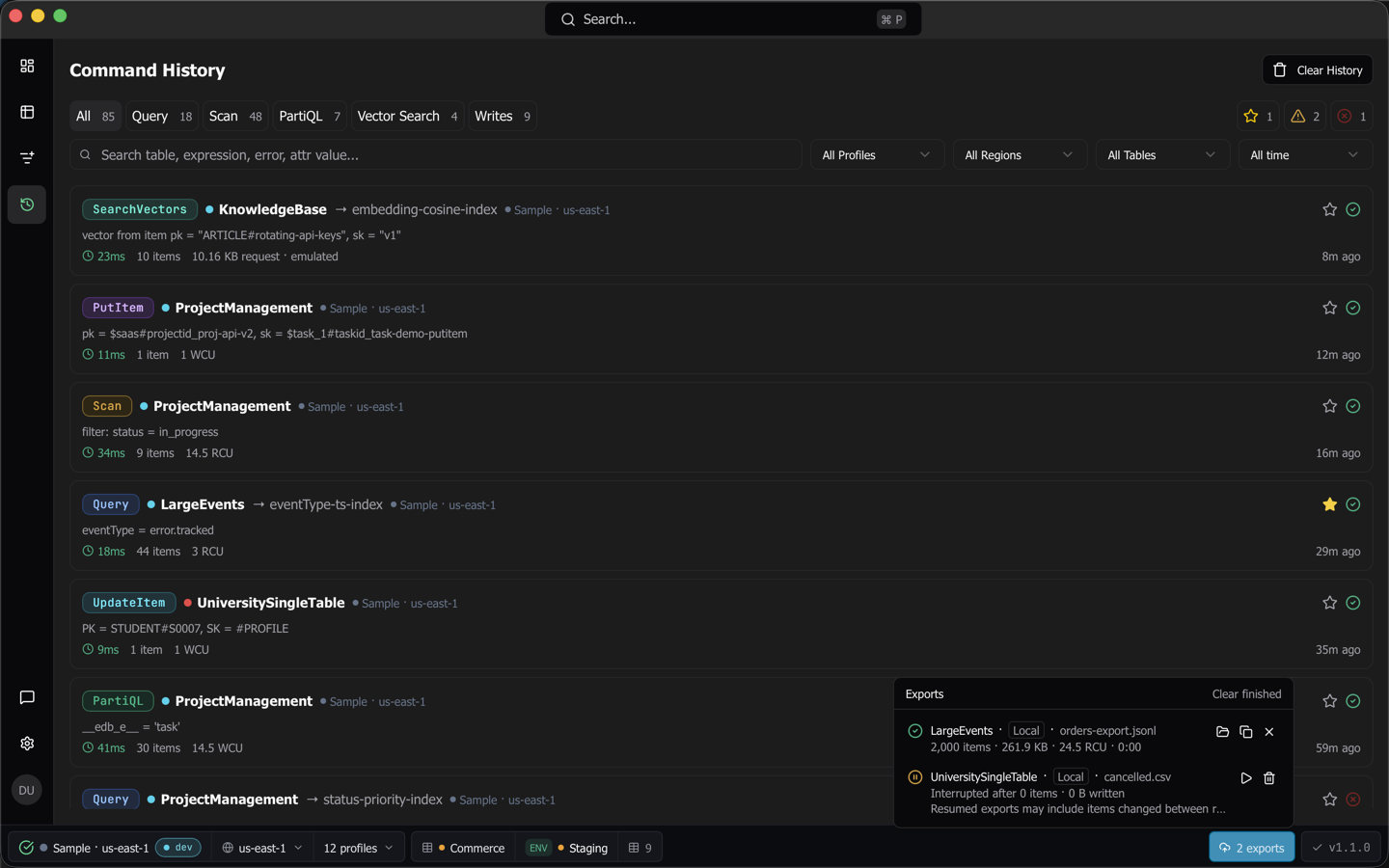
The destination’s directory must exist and nothing may be there already. Dynomatic resolves symlinks in the directory, so the destination in the answer is where the bytes will land and can differ from what was passed.
Note:
export_startis a write to Dynomatic’s own data, so it needs Allow writes. It does not consult the production check, because an export is a read that lands in a file on your own machine rather than a change to your data. A table you would not let an agent write a row to can still be exported at the Allow writes rung.
One at a time, per table and per destination
Dynomatic runs one export per table and one per destination. An export_start aimed at a table or a file another export already holds is turned down, and the answer says which of the two it was.
The registry holds 32 background jobs. A finished entry is dropped to make room before a running one is ever refused, and when every slot holds running work the next call is refused with the count and the limit.
A finished job answers export_status for an hour and is then dropped. After that the same id answers UnknownJob, and so does an id that never existed. The fix is the same for both, which is to start a new export.
Tip: Poll
export_statuson a timer rather than in a tight loop. A session is held to 120 calls a minute, which covers a poll every 500 ms and a bare loop not at all.
A cancel leaves the partial file behind
export_cancel stops a running export. Nothing lands at the destination, but the partly written file and its checkpoint stay next to it. That is deliberate, and it is what makes Resume and Discard work in the Transfers panel. Until you pick one, export_start refuses that destination.
A cancel on a job that already finished changes nothing and answers with its state.
Jobs belong to the session that started them
A job is owned by the MCP session that created it. If a client reconnects it gets a new session, and export_status on the old job id answers UnknownJob. The export itself keeps running and finishes normally, and the Transfers panel still shows it, so nothing is lost except the agent’s ability to poll it.
A caller with no session at all cannot start an export. Everything sessionless shares one bucket, so a job started from it would belong to nobody and be readable and cancellable by every other sessionless caller. Every client that completes the protocol handshake has a session.
What an agent cannot set
export_start takes the format, the attribute list and the prettify flag, and leaves the rest of the export options at the app’s defaults. The CSV dialect, the header row and the nested-attribute handling are reachable from the dialog and not from the tool.
Put a table in front of the user
show_table opens a table on the tab bar in the window you are looking at, with the agent’s query filled into the query builder. show_item does the same for one item by its primary key, and selects that row in the grid once the row is there, which is immediately when the item is already on screen and otherwise once you run the query.
Both read nothing and change nothing, so they work while the server is read-only. That is when an agent most wants to say “here, look at this”.
Dynomatic does not press Run for you
The tab opens with the query filled in and waits. This is the decision worth understanding, because it costs an agent a step.
An agent’s expression crosses four layers of Dynomatic’s own model before it reaches DynamoDB. The history decoder drops a clause it cannot parse, the expression schema filters before encoding, the expression provider re-sorts conditions between key conditions and filters when it mounts, and the stream builds the final command. Every one of those can drop or reshape a condition, and every dropped condition makes the read wider than the one asked for, against a table an agent chose and a bill you pay.
So the query is filled in, you read it, and you press Run. A query the builder cannot hold exactly opens the table with nothing filled in and says so, rather than showing you a narrowed version of it as the agent’s.
What that means in practice
A filter comes back rendered the way the query builder models it. A begins_with on a partition key, for instance, renders as an equality, because a partition key admits only equality. The tab shows a narrower query than the agent asked for, with nothing in the tab saying so, so read the query before you run it.
A show_table carrying a query always opens a new tab rather than focusing one already open on that table, because focusing would leave that tab’s existing filters in place. At the tab limit the open is refused with the usual tab-limit message.
What a write does to an open grid
When an agent writes to a table, a grid already open on that table re-runs its query, so the row appears without you clicking refresh. Every other tab is left alone.
A results grid showing PartiQL output is the exception. Re-running would mean executing the last statement again, which might be a write, so Dynomatic leaves that grid as it was.
A saved query an agent writes shows up at once, because that is Dynomatic’s own data rather than DynamoDB’s.
Last updated on