
Vector search
Vector search queries
Run a similarity search from a pasted vector, a row in the grid, or a sentence, and read the scored results.
Vector search is the fourth flavor of a query tab’s Query slot, alongside Filters, PartiQL, and Schema. It runs DynamoDB’s SearchVectors operation against one of the table’s vector indexes and returns the nearest items, scored and ranked.
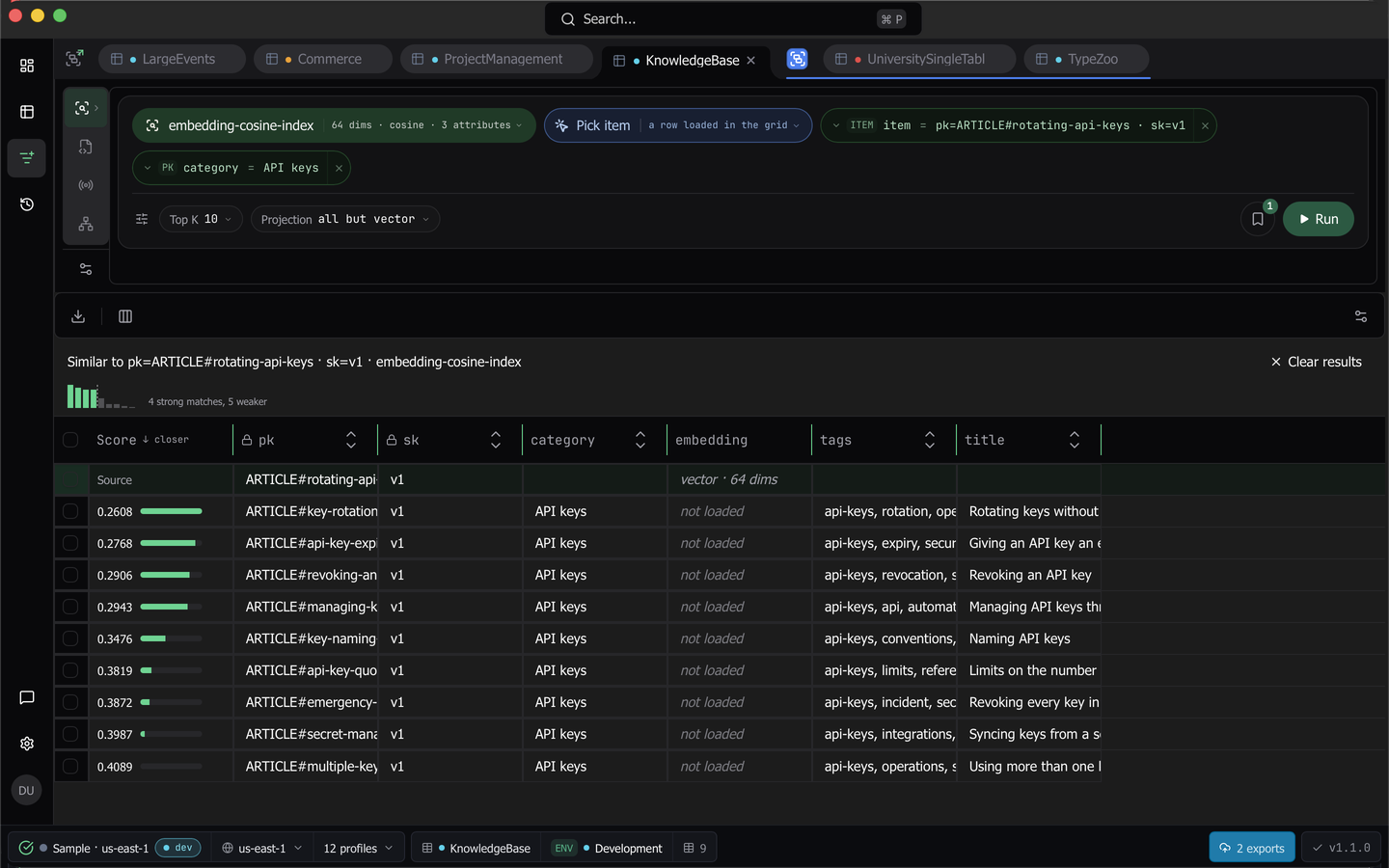
To open it, hover or click Query in the query tab’s rail and pick Vector search. The item appears only on a table that has a vector index whose connection can reach SearchVectors, and it is behind the Vector Search plan gate. A table with a vector index opens on this flavor by default.
Build a search
The bar uses the query builder’s pill vocabulary, in three rows.
Row 1, what you are searching with
- The index is the mode pill, tailed with its dimensions, distance function, and projection. Its menu lists the table’s vector indexes only, and marks one that is still indexing existing items.
- The search type pill switches between Query vector, Pick item, and Text. Each kind keeps its own content, so switching away and back never blanks what you had.
- The type pill beside it holds that kind’s content and opens the kind’s editor. Query vector takes a JSON array of numbers, and a wrong count is reported in place, such as “Expected 64 numbers, got 63”. Pick item lists the rows the builder has loaded that carry the index’s vector attribute, showing each row’s key summary and, where a recipe embeds that attribute, the text the recipe renders for it. Text takes a sentence.
- Search within appears last when the index partitions on an attribute. It is required, because it scopes the search rather than filtering it.
Row 2, inline filters
One pill per inline filter, with equality only, added from a menu limited to the index’s inline filter attributes. An index that declares none has no filters row at all.
Row 3, how much comes back
Top K sets how many nearest items are returned, from 1 to 100, with 10 as the default and presets for the common values. Beside it a projection chip states that the vector attribute is left out of results, and you can add it back through the Columns menu. On a KEYS_ONLY index that chip is replaced by a Load full items toggle, off by default, which reads the matching items with BatchGetItem after the search so every column shows.
Run stays focusable but inert while the draft is incomplete, and shows the first reason beside it.
Tip: Every pill popover commits on Enter and closes back onto its pill. Cmd+Enter anywhere in the bar (Ctrl+Enter outside macOS) commits, closes the open popover, and runs the search when the draft is valid.
Search by sentence
The Text search type embeds what you type with the model that produced the index’s vectors, then runs the same SearchVectors call. Dynomatic never guesses a model. It takes it from the embedding recipe whose target attribute is the index’s vector attribute, and without such a recipe the input stays focusable but inert and says so.
It is likewise inert when that recipe’s provider is no longer configured, when the provider now has a different kind, or when the recipe embeds at a different width than the index. When everything lines up the hint names the model and the width.
A text search uses the same Send item text to AI? consent the recipe’s dry run and backfill use, so there is no second prompt once you have agreed, and the same text under the same model and width is embedded once per app session. Under the input, Copy as query vector copies the exact JSON array and Use as query vector switches the search type to Query vector with that array in its box, so you can edit, re-run, or save it.
Find similar from the grid
Right-click a row in the Filters grid and choose Find similar to search with that row’s stored vector, picking the index when the table has more than one. The tab switches to the Vector search flavor with the bar set to that run, so Run repeats it. Find similar still works on a row whose vector the read projection left out, because Dynomatic reads the vector by key at call time, and a row that turns out to carry no vector says so and runs nothing.
Read the results
The source row is pinned first with a tint and a Source cell, and the hits follow in rank order.
- A leading Score column shows each hit’s raw score to four decimals, with a relevance meter where 1 is the closest within this result set.
- A direction hint says which way is closer, down for cosine and euclidean, up for dot product, with a tooltip when the direction had to be assumed for a distance function Dynomatic does not know.
- A strip above the grid names the search, draws the score distribution as one bar per hit, and captions it, for example “3 strong matches, 2 weaker”, with a divider where the scores break.
- While the index is still indexing existing items the strip says the results may be incomplete.
Rows are read-only here, because hits are projections rather than full rows, and auto-refresh is off while a similarity run is on screen. Clear results drops the run and keeps the draft.
A tab holds one similarity run. Switching to Filters, PartiQL, or Schema shows those results and leaves it in place, and coming back shows it again.
Save a search
The bookmark in row 3 saves the current search. A saved vector query records the index, the scoping, Top K, the load-full-items flag, and the source as you gave it, a pasted vector as its numbers, a picked item as its key alone, and a sentence as the text plus the vector its run produced, and it opens back as the same kind. A text search can be saved only after it has run, because the saved query keeps the vector that run produces, and a paste that does not parse never saves.
When a search is refused
A refusal replaces the grid with the reason and a Retry. Dynomatic refuses before any call when the query vector’s dimensions disagree with the index, when the index partitions on an attribute and no value was given for it, or when a filter names an attribute that is not one of the index’s inline filter attributes.
Two service-side cases get a specific message rather than a generic AWS error. On AWS proper SearchVectors uses its own hostname, so when the call cannot reach it, because of a VPC endpoint, a proxy, or an allowlist, the message names the hostname to add. When the role lacks the dynamodb:SearchVectors action, which existing DynamoDB read policies do not cover, the message says so and carries a ready-to-paste policy statement scoped to the index ARN.
Every search that ran is recorded in Command history as a SearchVectors entry naming the index and where the query vector came from, with the request size in bytes in place of read units.
Last updated on