Vector search
Vector indexes
Create, review, and delete DynamoDB vector indexes, with the limits, the immutable settings, and the production guard.
A vector index lets DynamoDB find items whose embedding is nearest to a query vector. Dynomatic lists every vector index on a table beside its GSIs and LSIs, and creates and deletes them from the same place.
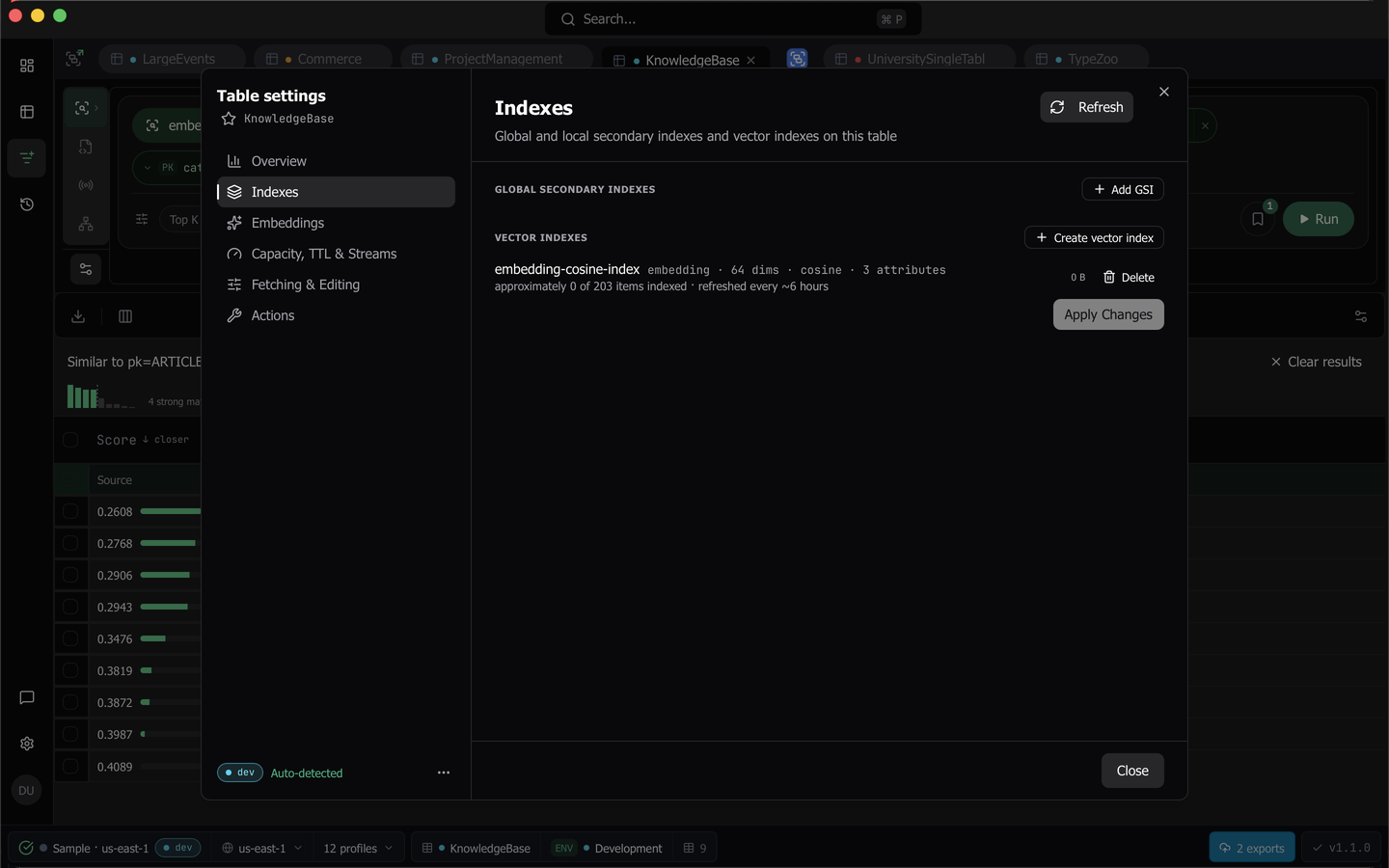
To get there, open a query tab on the table, click Table settings in the rail, and choose Indexes. The Manage indexes dialog reached from the Tables popover shows the same list.
What a vector index row tells you
Each row names the index, then its vector attribute, its dimensions, its distance function, and its projection, which is the one thing that tells two indexes on the same attribute apart.
- A Creating, Updating, or Deleting pill shows while DynamoDB is still working on the index.
- An Indexing existing items badge shows while DynamoDB is still covering the vectors already in your items. DynamoDB calls this backfilling, and it embeds nothing.
- A coverage line reads “approximately N of M items indexed”, refreshed about every six hours. It is always approximate, and it says so rather than showing a number it cannot stand behind.
- The index size appears where DynamoDB reports one.
- Embed jumps to the Embeddings section, and Delete removes the index.
The list refreshes itself every ten seconds until every index has settled, so an index that finishes is reflected without reopening anything. Refresh in the section header re-reads the table on demand.
Create a vector index
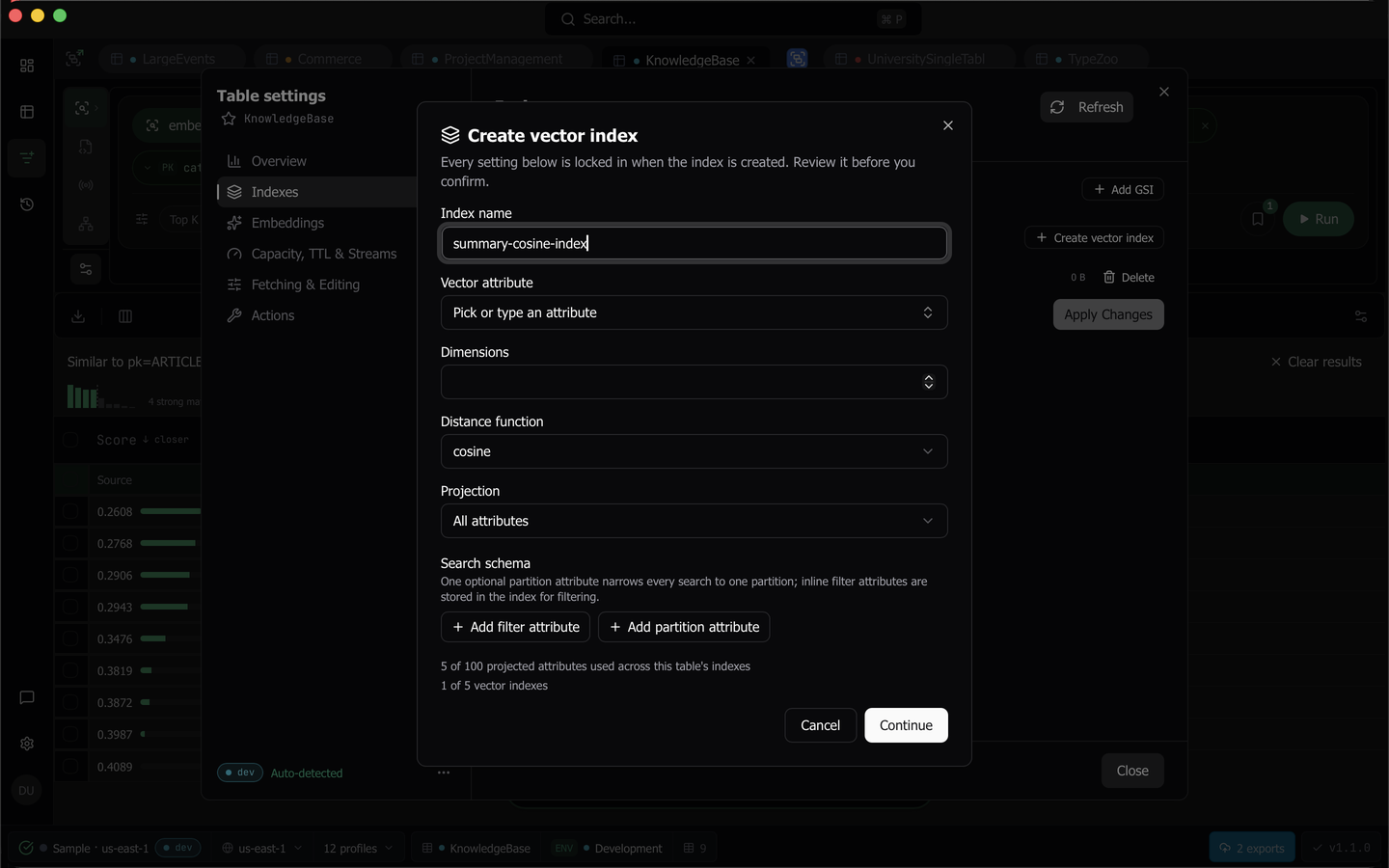
Click Create vector index. The dialog is a one-shot commitment, not a form you come back to, because every setting is locked in once DynamoDB has the index.
Choose where the vectors come from
With the Pro plan, the dialog first asks where the index’s vectors come from. Choose one and click Continue.
- Generate embeddings builds an embedding recipe in the dialog. Dynomatic writes the embeddings in the background, then creates the index once every item has one. See Generate the embeddings first.
- Use an existing attribute is for items that already carry vectors. The dialog goes to the edit step below, and the index is created when you confirm.
Without the Pro plan, the dialog opens on the edit step.
Fill in the edit step
- Index name, 3 to 255 characters of letters, numbers, dots, hyphens, and underscores. GSIs, LSIs, and vector indexes share one namespace on a table.
- Vector attribute, picked from the attributes Dynomatic has observed on the table, or typed in. Key attributes are excluded. An attribute another vector index already covers is offered, because a second index on it is legal, but the second index has to match the first one’s width.
- Dimensions, up to 4096. Choosing an attribute that an embedding recipe targets prefills the recipe’s width, tagged “from recipe”, along with cosine. A width you typed is never overwritten by a later prefill.
- Distance function, one of cosine, euclidean, or dot product.
- Projection, one of All attributes, Keys only, or Include specific attributes, where the last takes a list of projected attributes.
- Search schema, at most one partition attribute plus any number of inline filter attributes. Each row carries a declared type of String, Number, or Binary, prefilled from the table’s attribute definitions, then from what Dynomatic has observed, else String.
Two live counters sit under the fields. One reads “N of 100 projected attributes used across this table’s indexes”, turns red past the limit, and blocks. The other reads “N of 5 vector indexes”, and at five Continue goes inert with the reason announced. Both are DynamoDB’s limits, not Dynomatic’s.
When you set dimensions on a table that has ALL-projection GSIs, a warning names them, because every one of those indexes copies the vector and grows accordingly.
Review and confirm
Continue leads to a review step listing all six settings, each suffixed “cannot be changed after creation”, with the GSI growth warning again and one sentence of reasoning. DynamoDB backfills the index at no charge, so the cost is permanence and storage, and a wrong setting can only be fixed by deleting the index and creating it again.
On a table classified as production the confirm is red, reads Create on prod, and stays inert until you type the table name. Elsewhere it is a plain Create index. Back returns to the edit step with everything kept.
If the table is not ACTIVE when you confirm, the dialog waits and dispatches on its own once the table comes back. Success closes the dialog, and the row shows Indexing existing items until DynamoDB has covered the items already in the table.
Generate the embeddings first
With Generate embeddings, the dialog first shows the recipe form from the Embeddings section. If no embeddings provider is set up, it says so and offers Open Settings → AI. Save and dry run saves the recipe and dry runs it in place, behind the same consent prompt. Continue appears only when the dry run passes.
The edit step then fills in the vector attribute and the dimensions from the recipe and locks them, with the hint “Set by the embeddings recipe you just built.” The review step adds an Embeddings section that lists where the backfill writes, the model, and about how many items it embeds.
On the review step, click Start embedding. On a table not classified staging or development, the step says why the table counts as production, the button turns red, and it needs the table name typed first. On a production table it reads Start embedding on prod. The dialog closes, and one background job named Create vector index <name> on <table> does the rest in order:
- It embeds every item, as a recipe’s backfill does.
- It verifies the vectors.
- It sends the index create to DynamoDB.
- It waits until DynamoDB reports the index active.
The job saves its place as it goes, so you can close the dialog, or quit and reopen Dynomatic, without losing the pending index. If any item failed to write, the job does not create the index, and the recipe card offers Backfill again, which writes every item and then creates the index.
Follow a pending index
Until the job finishes, the index has its own row in the Indexes section, and the same job shows in the Background jobs panel and on the recipe’s card in Embeddings. The row’s pill reads Waiting for embeddings while the job embeds, Creating index while it sends the create and waits, and Create failed if the create did not go through. A line under it says where the job is, for example “Embedding items: 6 of about 12. Created when the backfill completes.”
- Resume continues a paused job in the step where it stopped.
- Retry runs a failed job again. After a failed create, it checks the table and sends the create again, without embedding anything again.
- Discard removes a failed or cancelled job. Items already embedded keep their vectors.
When the job completes, the pending row goes, and the index appears in the list like any other.
Delete a vector index
Delete on a row opens a dialog that says up front that your items are untouched, and that delete and recreate is how a wrong configuration is fixed. It is gated on typing the table name, with Copy name beside the field, and on a production table it reads Delete from prod and carries a production badge. The row shows Deleting until DynamoDB removes it.
DynamoDB refuses a table delete while one of its vector indexes is being created, updated, or deleted, and the delete-table dialog says so and names the index.
Things to know
- Creating and deleting vector indexes, and Generate embeddings, require the Pro plan. Without it the controls stay readable and focusable, with the reason announced.
- Vector indexes are never offered as a Query target. Picking one in a place that chooses an index opens the Vector search flavor instead of binding the builder.
- Recreating a table in another workspace does not copy its vector indexes. The dialog says so and points you back here.
- A table with a vector index does not scan on open, whatever its status, because DynamoDB charges a scan for every item’s full vector even when the projection leaves it out. A per-table override turns it back on.
- Next, generate the vectors themselves with an embedding recipe.
Last updated on