
Settings and platform
Feedback and support
Send a feature request, a bug report, general feedback, or a rating from inside the app, and see exactly what each submission carries.
Feedback goes straight from the app to the team that builds it, so you never have to leave what you were doing to describe a problem. Use it for a bug you just hit, a feature you wish existed, or a rating.
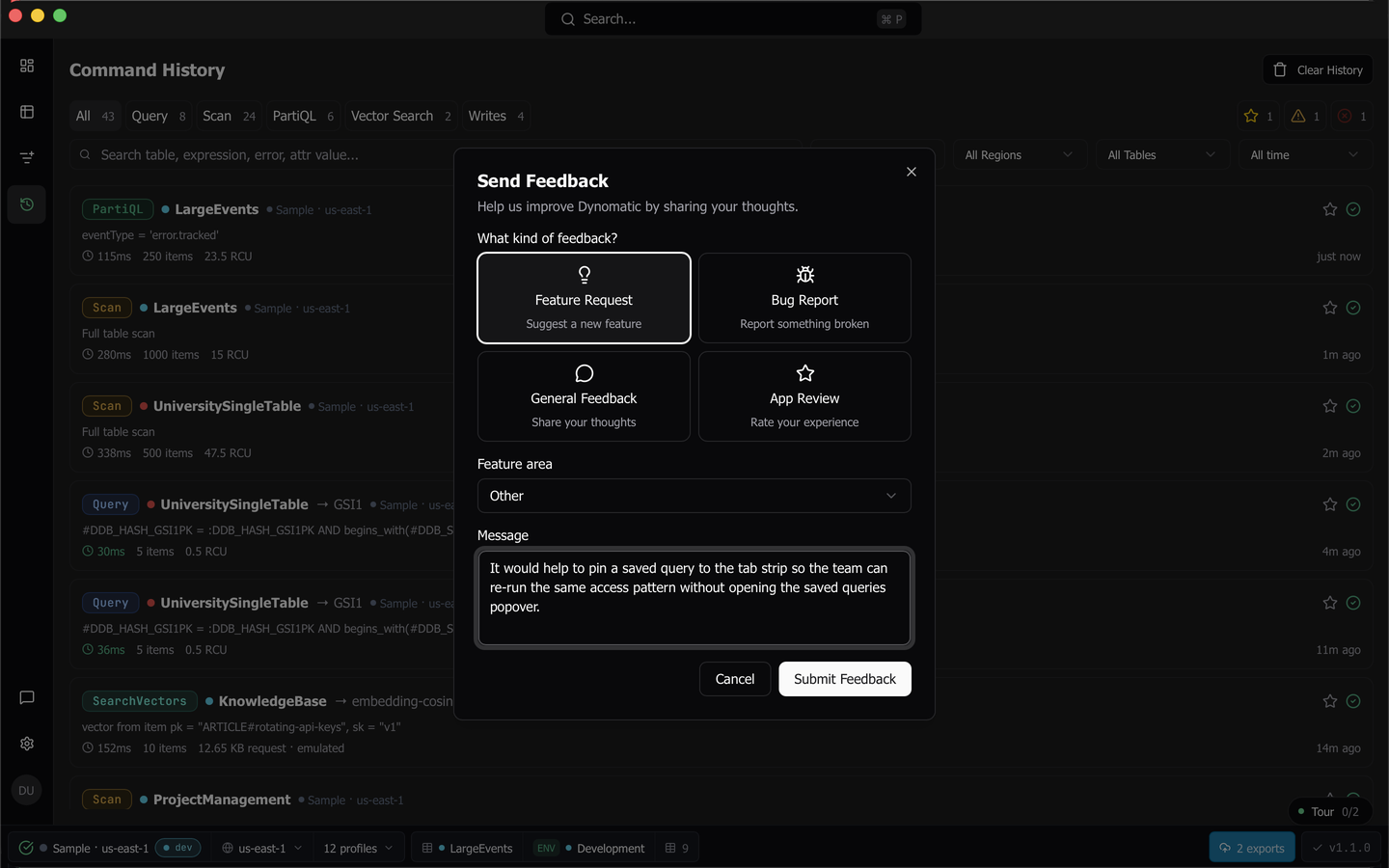
Send feedback
Open the dialog from the Feedback button in the rail, or press Cmd+Shift+F on macOS or Ctrl+Shift+F on Windows and Linux. Like every shortcut in the app, that binding is rebindable in Settings under Keyboard Shortcuts.
- Pick a type. Feature Request suggests something new, Bug Report describes something broken, General Feedback is for everything else, and App Review rates your experience.
- Pick a Feature area so the report lands with the right part of the app. The choices are Tables, Query, Settings, Profiles, Import/Export, Scripting, Auth, and Other.
- Choose a rating from one to five stars. This appears for App Review only, and is required there.
- Write your Message. It is required for the other three types, where it becomes Comments (optional) on a review.
- Choose Submit Feedback. A toast confirms the submission, and a failed send says so rather than silently dropping what you wrote.
Tip: For a bug, say what you did, what you expected, and what happened instead. The submission already carries your app version and platform, so you do not need to repeat them.
The review prompt
After ten launches, Dynomatic asks once whether you are enjoying it. Leave a review opens the same feedback dialog with App Review already selected, and Not now dismisses the prompt for good. It is shown once and never nags.
What a submission carries
Every submission includes what you typed, the type and feature area you picked, any star rating, the app version, and the platform. When you are signed in it also carries your user id and the email on your account, so a reply can reach you. Nothing is sent until you press Submit.
Feedback is the only place in the app where free text you write is sent anywhere. There is no crash reporting and no analytics, so a problem you do not report is a problem nobody sees. Security and data accounts for everything else that leaves the machine.
Reporting a Sample mode crash
If the local sample database crashes, the Sample pill in the status bar swaps its actions for Reset, View log, and Report. View log shows the sidecar’s own output if you want to read it first. Report files the crash through this same feedback channel as a bug report, with the crash reason, your app version and platform, and the last 50 log lines already attached, so you do not have to copy anything by hand.
Last updated on