Virtual fields
How virtual fields and table links work
What a virtual field computes, what a table link reads, and how expressions, links, display formats and scope fit together.
A virtual field is a named column that Dynomatic computes for each item in the results grid. A table link is a saved rule that lets those columns read items from another table. Neither one changes DynamoDB. Dynomatic keeps the definitions in its own local database and computes the values while it shows them.
A field is an expression, not an attribute
Every virtual field holds a JSONata expression. The expression reads the item and returns a value, so batteryPct returns the battery level and launchCostUsd / massKg returns a cost per kilogram. A preset is a short form that writes the expression for you. The column is read-only, because there is nothing in DynamoDB to edit.
Computing on read has a clear consequence. You can add, change or delete a field at any time without a migration, and the items stay exactly as your application wrote them. The cost is that a field exists only inside Dynomatic. Your application, the AWS console and other tools never see it.
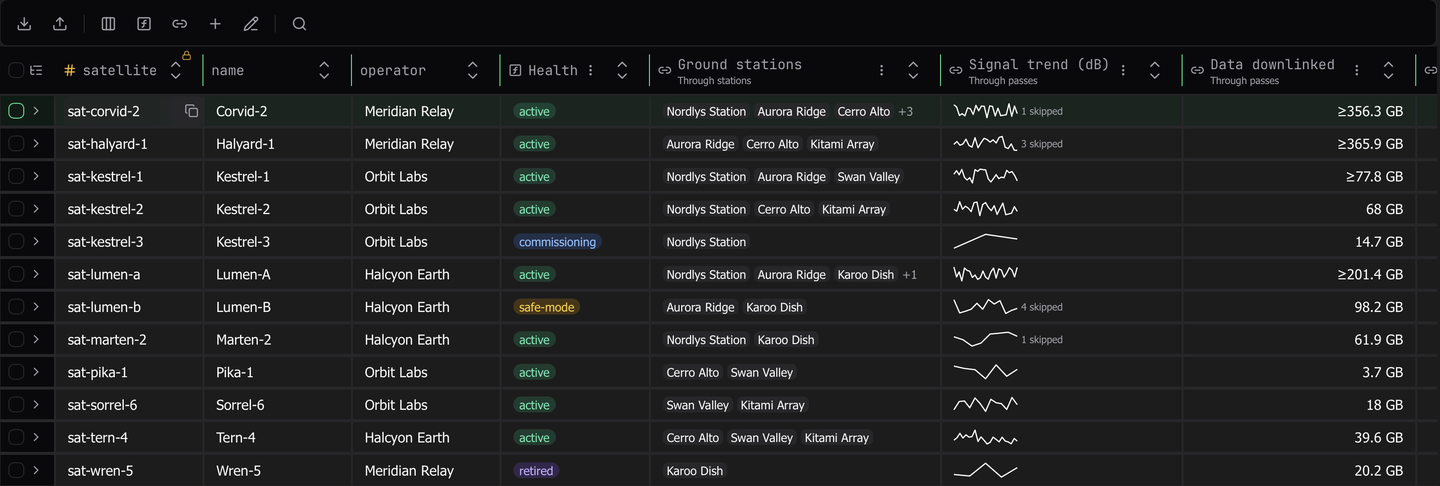
The header of a computed column carries a boxed ƒ, and its tooltip reads Computed. Not stored in DynamoDB. The mark is there so that nobody mistakes a computed column for stored data.
A link decides what an expression can reach
An expression on its own sees one item. A table link widens that. It names a target table and builds the target’s key from each row of the open table, then reads the matching items. A link reads in one of three ways.
| Read | What each row reads |
|---|---|
| One item | The one item whose key the row builds |
| Items from a list | One item for each element of a list or set on the row |
| Items that match a key | Every item whose partition key matches the row, optionally narrowed by a sort key condition, with DynamoDB Query |
A link shows nothing by itself. Columns read through it.
- A related column shows one attribute of the linked item, such as a pass’s satellite name.
- A collection column sums up the items a query link reads, as a count, chips, an aggregate, or a sparkline.
- Any expression can call
$related("satellite")to use the linked item in a calculation.
Columns read through a link carry a link icon instead of the ƒ, and a line under the name says which link they read through, such as Through passes.
Links are always explicit. Data Model inference can find structure in your items, but it never creates a link. A link issues DynamoDB reads, so you choose which tables it reads and how.
Four places an expression runs
The same JSONata language runs in four places, and each one gives the expression different input.
| Where | The expression reads |
|---|---|
| A field’s expression | The current item. It can call $related and $relatedAll |
| A link’s key expression | The source row, and $value for each element when the link reads items from a list |
| A collection column’s aggregate | The row’s related items, as $items |
| A field computed across loaded rows | Each loaded row, for the value, key or group of a rank, share, running total or duplicate count |
Expression reference lists what each place can read and call.
The format draws, the value stays
A display format changes how a cell draws its value and nothing else. batteryPct returns 0.88, and the Percent format draws it as 88%. Sort, search, Copy Value, export and agents all use 0.88. Keeping the two apart means a format can never corrupt a comparison or an exported file.
Scope says what a value covers
A value is only as complete as the items it was computed from. A count over the first 25 related passes is a correct count of 25 items, and it is still not the satellite’s pass count. Dynomatic marks such values with +, ≥ or ~ until Compute Exact reads the rest. A field computed across loaded rows says Depends on loaded rows for the same reason.
Why related values can be partial explains the reads behind this and what they cost.
Where to go next
- Explore the Orbit sample tables shows every kind of field on seeded data, with no AWS account.
- Create a virtual field and Link another table cover the two dialogs.
- Cell states, limits, and reads lists plan availability, limits, and where definitions are stored.
Last updated on