Virtual fields
Sort, filter, and export computed values
Sort and search by a computed column, narrow the loaded rows with a computed filter, copy a stored value, and export computed columns to a file.
Computed and related columns work with the grid’s sort, search, filters and export. Each one uses the value the expression returned, never the text a display format draws.
Sort by a computed column
Click the sort button in the column’s header. Values compare the way attribute values do, so numbers sort by value. Rows without a value sort after every value in both directions: first rows with no value or where the field does not apply, then errors, then rows not evaluated yet.
A collection column sorts by its aggregate’s value, or by its count for the other displays. While some rows are still loading or count only their first items, the header says Sorted by loaded counts, and the order uses what has loaded so far.
Search computed values
Type in the results search. It matches a computed value as stored, not as formatted, so search 1234.5 to find a cell that draws $1,234.50. A matching cell with a display format gets a ring instead of highlighted text. A collection cell matches on its count and the values it shows.
Copy a stored value
Right-click a computed cell and choose Copy Value. It copies the stored value, so a Currency cell that shows $1,234.50 copies 1234.5. On a collection cell it copies the cell’s text, such as 10+.
A computed cell has no Filter by, because DynamoDB holds no value to filter on.
Filter the loaded rows by a computed value
- In the Filters builder, click + on the filter row.
- In the menu, find the field under Computed fields (loaded rows only), after the attributes. Each one carries the computed mark and its type, such as
Computed · Number. - Choose the type, Number, String or Boolean, then an operator and a value.
| Type | Operators |
|---|---|
| Number | =, !=, >, >=, <, <=, BETWEEN, EXISTS, NOT EXISTS |
| String | =, !=, CONTAINS, BEGINS WITH, EXISTS, NOT EXISTS |
| Boolean | = and != against true or false, EXISTS, NOT EXISTS |
The pill ends in a muted loaded rows note. Computed filters join each other with AND and narrow the rows the attribute filters returned. The popover, and the results count beside the fetch stats, say how many rows remain, such as 3 of 500 loaded rows shown.
Note: A computed filter narrows the rows already loaded. DynamoDB never receives it, so it never changes what a page reads or costs. Rows that later pages load are filtered too.
A row stays hidden until its cell is evaluated. An error fails every condition, and a row with no value passes only NOT EXISTS. Computed filters apply only in Filters mode. They hide no rows in PartiQL, Schema or Vector mode, and apply again when you return. Clear removes them with the attribute filters.
Export computed columns
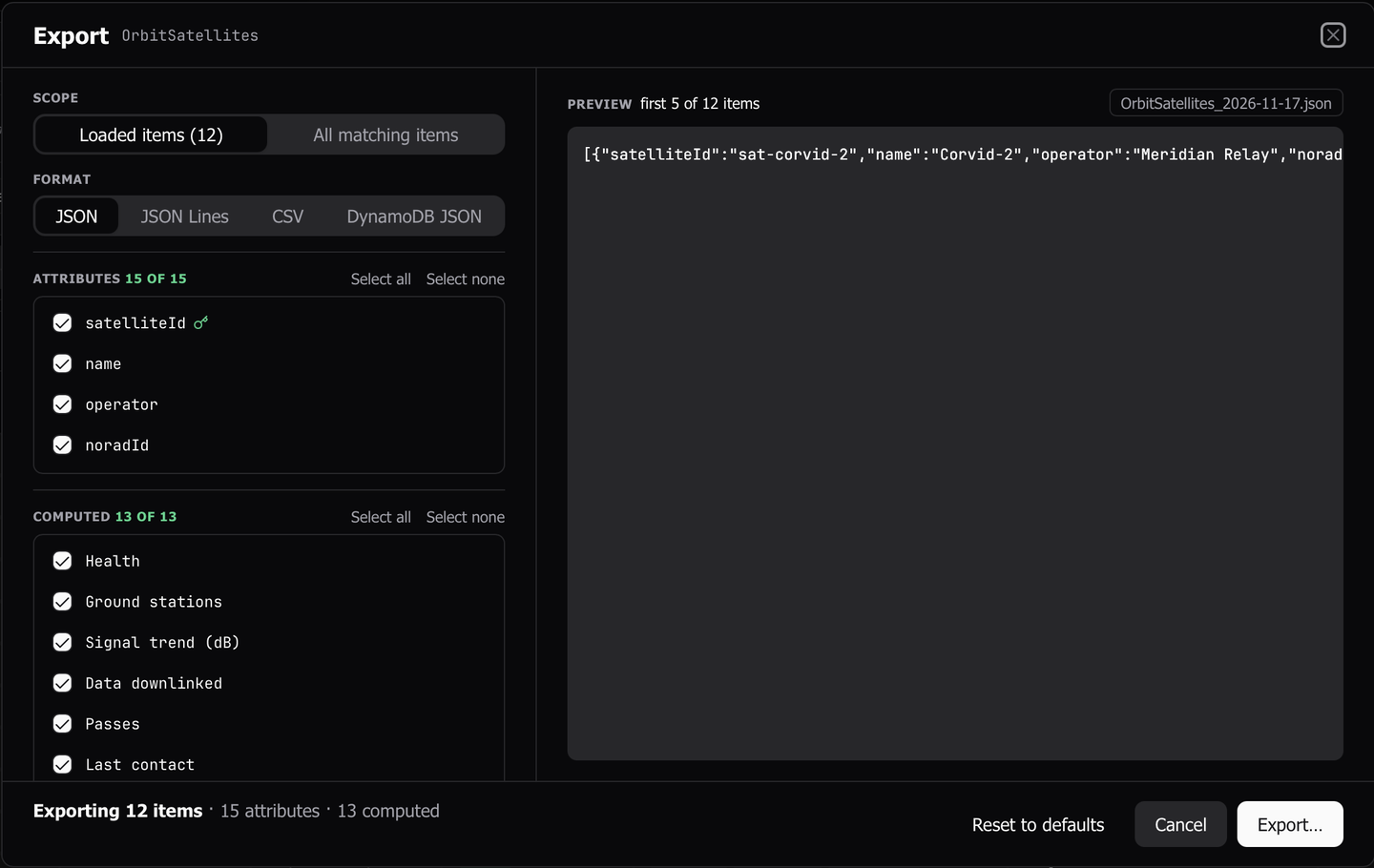
- Open the export dialog. Its Computed section lists the table’s fields, starting with the computed columns the grid shows.
- Tick the fields to export, or use Select all and Select none.
- Choose a scope and a format, and export as usual. See Export.
Each picked field becomes a column named after the field. When an attribute, a key, or another pick already has that name, the column is named name (computed).
- A value is written as stored, never in its display format.
- A field with no value for an item writes like a missing attribute. A CSV gets an empty cell, and the JSON formats leave it out.
- An expression that fails or runs out of time writes an empty value, and the completion message counts those cells.
- A collection column writes its display text to a CSV, and the row’s related items as a list to JSON, JSON Lines and DynamoDB JSON. The export reads each row’s query to the end first, so a file never holds a value over part of a row’s items. A row past 1,000 related items or 16 MiB writes an empty value.
- All matching items reads related items page by page, and its row in the Transfers panel shows its related reads apart from the table’s own, such as
Related reads: 3 RCU. - A field computed across loaded rows cannot be picked for All matching items, because that export has no loaded rows. The other scopes write the values the grid shows.
While a computed filter applies, the export dialog’s Matching scope writes the rows the filter leaves. While the grid shows one row per related item, an export of loaded, selected or matching rows writes the joined rows.
Last updated on